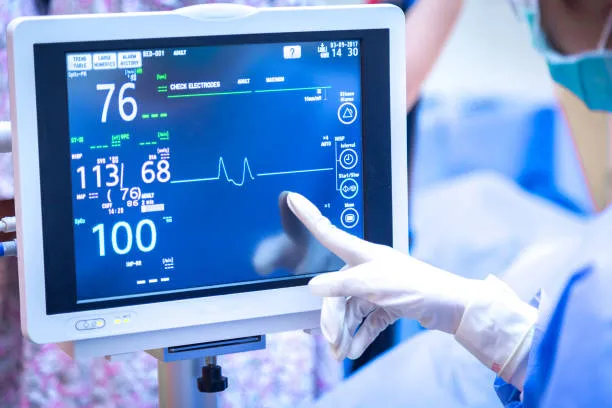
स्वास्थ्य सेवा में, रोगी की देखभाल के लिए समय पर और सटीक महत्वपूर्ण संकेत ट्रैकिंग महत्वपूर्ण है - रक्तचाप में अचानक गिरावट या हृदय गति में वृद्धि का पता लगाना जीवनरक्षक हो सकता है. रोगी मॉनिटर टच स्क्रीन चिकित्सकों के उपयोग के लिए फ्रंटलाइन इंटरफ़ेस है, व्याख्या, और इस डेटा पर कार्रवाई करें. Unlike clunky button-based monitors of the past, टच स्क्रीन बातचीत को सरल बनाती है: clinicians can swipe to view trends, tap to adjust alarms, and zoom in on readings with ease. This guide explores how these touch screens enhance vital sign tracking, key features to look for, and best practices for integration—helping healthcare facilities deliver efficient, precise patient monitoring.

How Patient Monitor Touch Screens Enhance Vital Sign Tracking
1. Intuitive Data Visualization
Real-time dashboards: Touch screens display vital signs (हृदय दर, SpO₂, blood pressure, तापमान) in clear, color-coded dashboards. उदाहरण के लिए, a patient with normal vitals might have a green “status” badge, while a patient with tachycardia (high heart rate) triggers a yellow or red alert—enabling at-a-glance assessment.
Trend analysis: Clinicians can use touch gestures (swipe left/right) to view vital sign trends over minutes, घंटे, or days. This helps identify patterns (जैसे, “Does blood pressure drop every afternoon?”) that inform care plans.
अनुकूलन योग्य लेआउट: Staff can rearrange screen elements (जैसे, make the SpO₂ reading larger for patients with respiratory issues) to prioritize the most critical data for each patient.
2. Streamlined Interaction with Alerts
Quick alarm acknowledgment: When a vital sign exceeds a threshold (जैसे, blood pressure >180/120), the touch screen flashes an alarm. Clinicians can tap “Acknowledge” or “Silence” directly on the screen—faster than navigating button menus.
Alarm customization: With a few taps, staff can adjust alarm limits (जैसे, lower the heart rate alarm for a bradycardic patient) or set up multi-patient alarm groups (useful in ICUs with multiple monitors).
3. Seamless Integration with EHRs
वन-टच डेटा लॉगिंग: Touch screens let clinicians tap to log vital signs directly into the Electronic Health Record (ईएचआर). This eliminates manual charting errors and saves time compared to transcribing data from a non-touch monitor.
EHR data pull: The screen can pull patient history (जैसे, “Past blood pressure readings”) from the EHR, giving clinicians context when assessing current vitals.
Key Features of Effective Patient Monitor Touch Screens
1. Durability for Healthcare Environments
रोगाणुरोधी कोटिंग्स: Screens with silver-ion or copper-based coatings resist the growth of bacteria (जैसे, MRSA, सी. diff) that thrive on shared surfaces—critical for infection control.
रासायनिक प्रतिरोध: Can withstand frequent cleaning with hospital-grade disinfectants (जैसे, चतुर्धातुक अमोनियम समाधान) खरोंच या स्पर्श संवेदनशीलता खोए बिना.
संघात प्रतिरोध: Tempered glass or rugged polymer surfaces survive accidental bumps (जैसे, from a rolling IV pole) common in busy hospital rooms.
2. Touch Performance and Accuracy
दस्ताने-हाथ की अनुकूलता: Clinicians often wear gloves—top-tier touch screens detect touches through latex, Nitrile, or even double gloves.
मल्टी-टच समर्थन: Allows pinch-to-zoom on trend graphs or simultaneous taps (जैसे, adjusting two alarm settings at once) for faster workflow.
कम अव्यक्ता: Touches register instantly (≤50ms response time) so clinicians don’t experience lag when accessing critical data.
3. Connectivity and Scalability
वायरलेस क्षमताएं: Some touch screens support Wi-Fi or Bluetooth, enabling data transfer to mobile devices (जैसे, a nurse’s tablet) for bedside monitoring without being tethered to the monitor.
Modular expansion: Screens can integrate with add-on modules (जैसे, a CO₂ monitor for ventilated patients) via USB or Ethernet, so facilities can upgrade without replacing the entire system.
Choosing the Right Patient Monitor Touch Screen
1. Align with Clinical Workflows
Department-specific needs: An ICU needs touch screens with advanced alarm management and multi-patient views, while a general ward might prioritize simplicity and ease of use for rotating staff.
Training requirements: If your team includes new grads or travelers, opt for screens with intuitive, icon-based interfaces (बनाम. complex menus) to reduce training time.
2. तकनीकी विशिष्टताओं का मूल्यांकन करें
स्क्रीन का आकार और रिज़ॉल्यूशन: बड़ी स्क्रीन (12–15 inches) with 1080p+ resolution improve readability, especially in low-light rooms.
Brightness and visibility: 400+ nits brightness ensures visibility under bright hospital lights or through window glare.
Power backup: Built-in batteries keep the screen running during power outages, so vital signs remain visible.
3. स्वामित्व की कुल लागत पर विचार करें (टीसीओ)
Warranty and support: Look for 3–5 year warranties that cover accidental damage (common in healthcare). Prioritize vendors with 24/7 technical support for quick issue resolution.
भविष्य प्रूफिंग: Choose screens with software update capabilities to add new features (जैसे, AI-powered trend prediction) as technology evolves.
FAQs About Patient Monitor Touch Screens
Q1: Can Patient Monitor Touch Screens be used in MRI suites?
ए 1: हाँ, but choose “MRI-safe” models (non-magnetic materials, no metal components) to avoid interference with imaging equipment.
Q2: How often should these touch screens be cleaned?
ए2: After each patient use (per hospital infection control protocols). Their durable coatings withstand frequent cleaning without damage.
Q3: Do they work with all EHR systems?
ए3: Most integrate with major EHRs (महाकाव्य, सर्नर, Meditech) HL7 या API के माध्यम से. Confirm compatibility with your vendor before purchasing.
Q4: What’s the typical lifespan of a Patient Monitor Touch Screen?
ए4: 7–10 years with proper care—longer than traditional button-based monitors (which last 3–5 years).
निष्कर्ष
Patient Monitor Touch Screens revolutionize vital sign tracking by making data access intuitive, तेज़, and error-free—critical for delivering timely patient care. By selecting a screen with durable, user-friendly features and aligning it with your clinical workflows, you can enhance both patient safety and staff efficiency.
If you’re unsure which Patient Monitor Touch Screen is right for your facility (जैसे, matching EHR compatibility, assessing department needs, या टीसीओ को समझना), हमारी वेबसाइट पर फॉर्म भरें. Our healthcare technology experts will analyze your requirements and recommend the ideal solution for accurate, seamless vital sign monitoring.