ເມື່ອປຶກສາຫາລືວ່າຈະໃຊ້ຮາດດິດກົນຈັກຫຼືບໍ່ (ນະຄອນ HDD) ຫຼືໄດລັດແຂງ (SSD) ສໍາລັບ 43 ນິ້ວ Capacitive ໜ້າຈໍສຳຜັດ, ພວກເຮົາຈໍາເປັນຕ້ອງພິຈາລະນາຢ່າງສົມບູນຄຸນລັກສະນະການປະຕິບັດຂອງທັງສອງແລະຄວາມຕ້ອງການການນໍາໃຊ້ຕົວຈິງ.
ຂໍ້ດີແລະຂໍ້ເສຍຂອງຮາດດິດກົນຈັກ (ນະຄອນ HDD)
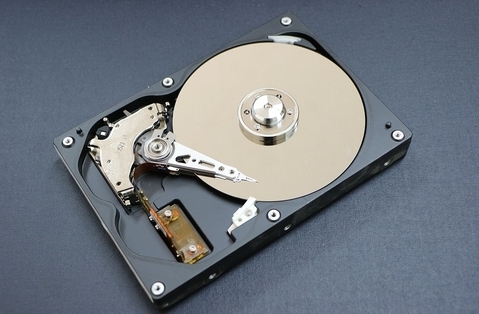
ຮາດດິດກົນຈັກແມ່ນອຸປະກອນການເກັບຮັກສາແບບດັ້ງເດີມທີ່ຂໍ້ມູນຖືກເກັບໄວ້ໃນແຜ່ນສະນະແມ່ເຫຼັກທີ່ຫມຸນແລະເຂົ້າເຖິງແລະດໍາເນີນການຜ່ານຫົວອ່ານ / ຂຽນເທິງແຂນຫຸ່ນຍົນ.. ຂໍ້ໄດ້ປຽບຕົ້ນຕໍຂອງມັນປະກອບມີ:
ລາຄາຂ້ອນຂ້າງຕໍ່າ: ເມື່ອປຽບທຽບກັບການຂັບແຂງ, ຮາດດິດກົນຈັກມີຕົ້ນທຶນການຜະລິດຕ່ໍາ, ເຮັດໃຫ້ລາຄາຂອງພວກເຂົາສາມາດໃຫ້ໄດ້ຫຼາຍຂຶ້ນ.
ຄວາມອາດສາມາດເກັບຮັກສາຂະຫນາດໃຫຍ່: ຮາດດິດກົນຈັກໂດຍທົ່ວໄປແລ້ວມີຄວາມສາມາດໃນການເກັບຮັກສາຂະຫນາດໃຫຍ່ຫຼາຍກ່ວາໄດລັດແຂງ, ເຮັດໃຫ້ມັນເຫມາະສົມສໍາລັບການເກັບຮັກສາຂໍ້ມູນຈໍານວນຫລາຍ.
ຄວາມເປັນໄປໄດ້ສູງຂອງການຟື້ນຟູຂໍ້ມູນ: ຖ້າຮາດດິດກົນຈັກເສຍຫາຍ, ບາງຄັ້ງຂໍ້ມູນສາມາດຟື້ນຕົວໂດຍວິທີການເປັນມືອາຊີບ.
ເຖິງຢ່າງໃດກໍ່ຕາມ, ຮາດດິດກົນຈັກຍັງມີຂໍ້ບົກຜ່ອງບາງຢ່າງ:
ຄວາມໄວໃນການອ່ານ ແລະຂຽນຊ້າ: ເນື່ອງຈາກຄວາມຕ້ອງການສໍາລັບການເຄື່ອນໄຫວກົນຈັກໃນການເຂົ້າເຖິງຂໍ້ມູນ, ຄວາມໄວໃນການອ່ານແລະຂຽນຂອງຮາດດິດກົນຈັກແມ່ນຂ້ອນຂ້າງຊ້າ.
ການບໍລິໂພກພະລັງງານສູງ: ຮາດດິດກົນຈັກຕ້ອງການໄຟຟ້າຫຼາຍໃນລະຫວ່າງການປະຕິບັດງານ.
ອັດຕາການລົ້ມເຫຼວສູງ: ເນື່ອງຈາກມີອົງປະກອບກົນຈັກ, ອັດຕາການລົ້ມເຫຼວຂອງຮາດດິດກົນຈັກແມ່ນຂ້ອນຂ້າງສູງ.
ຂໍ້ດີແລະຂໍ້ເສຍຂອງ Solid State Drives (SSDs)
Solid state drives ໃຊ້ຊິບຫນ່ວຍຄວາມຈໍາ flash ເປັນສື່ເກັບຮັກສາ, ທີ່ມີຂໍ້ໄດ້ປຽບການປະຕິບັດທີ່ສໍາຄັນ:
ຄວາມໄວອ່ານແລະຂຽນໄວ: Solid state drives ມີຄວາມໄວໃນການອ່ານ ແລະຂຽນໄວກວ່າຮາດດິດກົນຈັກ, ເຊິ່ງສາມາດປັບປຸງຄວາມໄວການຕອບໂຕ້ຂອງລະບົບຢ່າງຫຼວງຫຼາຍ.
ຄວາມທົນທານສູງ: Solid state drives ບໍ່ມີອົງປະກອບກົນຈັກ, ເຮັດໃຫ້ເຂົາເຈົ້າທົນທານຫຼາຍແລະມີຄວາມຕ້ານການຊ໊ອກທີ່ເຂັ້ມແຂງ.
ການບໍລິໂພກພະລັງງານຕໍ່າ: Solid state drives ໃຊ້ໄຟຟ້າຫນ້ອຍລົງໃນລະຫວ່າງການປະຕິບັດງານ.
ບໍ່ມີສິ່ງລົບກວນ: Solid state drives ບໍ່ສ້າງສິ່ງລົບກວນໃນລະຫວ່າງການປະຕິບັດງານ.
ເຖິງຢ່າງໃດກໍ່ຕາມ, Solid-state drives ຍັງມີຂໍ້ຈໍາກັດບາງຢ່າງ:
ລາຄາຂ້ອນຂ້າງສູງ: Solid state drives ມີຕົ້ນທຶນການຜະລິດທີ່ສູງຂຶ້ນ, ດັ່ງນັ້ນລາຄາຂາຍຂອງພວກເຂົາກໍ່ສູງຂຶ້ນ.
ຄວາມອາດສາມາດເກັບຮັກສາຈໍາກັດ: ເມື່ອປຽບທຽບກັບຮາດດິດກົນຈັກ, Solid-state drives ມີຄວາມຈຸນ້ອຍກວ່າ.
ຄວາມຫຍຸ້ງຍາກໃນການຟື້ນຕົວຂໍ້ມູນ: ເມື່ອໄດລັດແຂງເສຍຫາຍ, ຄວາມເປັນໄປໄດ້ຂອງການຟື້ນຟູຂໍ້ມູນແມ່ນຂ້ອນຂ້າງນ້ອຍ.
ເລືອກຄໍາແນະນໍາ
ສໍາລັບການຄັດເລືອກຂອງຮາດດິດສໍາລັບການສະແດງຜົນສໍາພັດ, ພວກເຮົາສາມາດເຮັດການຕັດສິນໃຈໂດຍອີງໃສ່ຄໍາແນະນໍາຕໍ່ໄປນີ້:
ຖ້າທ່ານສຸມໃສ່ຄວາມສາມາດໃນການເກັບຮັກສາແລະປະຫຍັດຄ່າໃຊ້ຈ່າຍ, ການເລືອກຮາດດິດກົນຈັກອາດຈະເຫມາະສົມກວ່າ, ໂດຍສະເພາະໃນເວລາທີ່ເກັບຮັກສາຂໍ້ມູນຈໍານວນຫລາຍ.
ຖ້າຫາກວ່າການດໍາເນີນການສູງແລະສະຖຽນລະພາບ, Solid-state drives ເປັນທາງເລືອກທີ່ດີກວ່າຍ້ອນວ່າພວກເຂົາສາມາດປັບປຸງຄວາມໄວຕອບສະຫນອງແລະຄວາມຫມັ້ນຄົງຂອງລະບົບຢ່າງຫຼວງຫຼາຍ.
ການປະສົມປະສານຂອງຮາດດິດຄູ່: ສໍາລັບຜູ້ໃຊ້ທີ່ຕ້ອງການທັງການເກັບຮັກສາຄວາມອາດສາມາດຂະຫນາດໃຫຍ່ແລະປະສິດທິພາບສູງ, ໄດ້ “ຮາດດິດຄູ່” ຫຼື “SSD+HDD” ການປະສົມປະສານສາມາດພິຈາລະນາ. ຕິດຕັ້ງລະບົບປະຕິບັດການ ແລະແອັບພລິເຄຊັນທີ່ໃຊ້ທົ່ວໄປຢູ່ເທິງໄດຣຟ໌ລັດແຂງ ສຳລັບການເລີ່ມຕົ້ນໄວ ແລະຄວາມໄວໃນການຕອບສະໜອງ; ພ້ອມກັນເກັບຮັກສາຂໍ້ມູນຄວາມຈຸຂະຫນາດໃຫຍ່ໃນຮາດໄດກົນຈັກເພື່ອຕອບສະຫນອງຄວາມຕ້ອງການເກັບຮັກສາ.
ໃນບົດສະຫຼຸບ, ບໍ່ມີຄໍາຕອບທີ່ກໍານົດໄວ້ວ່າບໍ່ວ່າຈະເປັນຮາດດິດກົນຈັກຫຼືການຂັບແຂງລັດແມ່ນດີກວ່າສໍາລັບການ 43 ນິ້ວ Capacitive Touchscreen, ແຕ່ເປັນການພິຈາລະນາທີ່ສົມບູນແບບໂດຍອີງໃສ່ຄວາມຕ້ອງການຄໍາຮ້ອງສະຫມັກຕົວຈິງແລະງົບປະມານ.