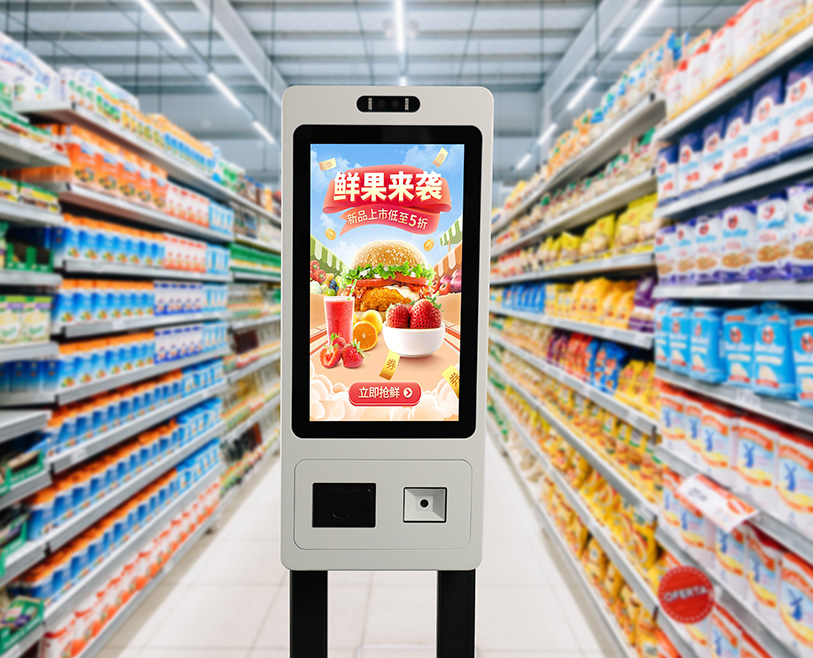
In today’s competitive retail and service landscape—where customer retention is 5x more cost-effective than acquisition—Touch Screens for Loyalty Program Kiosks have emerged as a cornerstone of successful loyalty strategies. Unlike clunky, outdated sign-up methods (например, paper forms, staff-assisted enrollment) that deter participation, these specialized touch screens transform loyalty program interaction into a seamless, self-service experience. Для предприятий розничной торговли, гостеприимство, grocery, and QSR (Quick-Service Restaurants), they lower barriers to entry for new members, simplify reward redemptions for existing customers, and capture valuable data to personalize offers. Whether placed at retail checkout lines, restaurant entrances, grocery store aisles, or hotel lobbies, Loyalty Kiosk Touch Screen bridge the gap between businesses and their most valuable asset—repeat customers. В этой статье рассматриваются их основные особенности., ключевые приложения, и преобразующие преимущества, helping marketing and operations teams select touch screen solutions that boost loyalty program adoption, engagement, and long-term customer retention.
Core Features of Touch Screen for Loyalty Program Kiosks
1. Intuitive Self-Service Design for Maximum Adoption
The defining advantage of Loyalty Kiosk Touch Screen is their ability to drive high participation by making loyalty interactions effortless—critical for growing program membership:
Simplified enrollment flows: Streamlined 3-step sign-up (например, “Enter Phone/Email,” “Create PIN,” “Select Preferences”) with large, easy-to-tap buttons, reducing enrollment time to 60 секунды или меньше.
Visual reward tracking: High-contrast displays show points balances, available rewards (например, “100 Points = $10 Выключенный”), and progress toward milestones (например, “5 More Purchases for a Free Meal”), keeping customers motivated.
Guided navigation: On-screen prompts (например, “Tap Here to Redeem”) and error-proof inputs (например, auto-formatting phone numbers) eliminate confusion, even for tech-unfamiliar users (например, elderly customers).
2. Прочный & Customer-Focused Construction
Loyalty kiosks live in high-traffic, public environments—and these touch screens are built to withstand constant use and diverse conditions:
Scratch-resistant & smudge-proof glass: 3mm tempered glass with anti-fingerprint coating resists daily wear from repeated taps, food residue (in restaurants), or shopping cart bumps (in retail).
Accessibility features: 500+ nits brightness for visibility in bright stores, adjustable font sizes (12pt–24pt), и поддержка 15+ языки (например, Английский, испанский, Мандарин) to cater to diverse demographics.
Compact, space-efficient design: 10–15 inch screens that fit in tight spaces (например, between checkout lanes, near restaurant host stands) without disrupting foot traffic.
3. Seamless Loyalty Program Integration
These Loyalty Киоск Touch Screen sync with existing loyalty platforms to maintain data consistency and operational efficiency:
Loyalty software compatibility: Works with leading loyalty tools (например, Thanx, Belly, LoyaltyLion, Salesforce Loyalty Management) to pull real-time points data and update accounts instantly.
Multi-identification support: Integrates with barcode scanners (for loyalty cards), NFC readers (for phone taps), and camera-based QR code scanners, letting customers access accounts via their preferred method.
CRM sync: Automatically feeds enrollment data (например, предпочтения клиента, purchase history) into CRM systems, enabling personalized follow-ups (например, “We see you love coffee—here’s a points bonus!”).
4. Personalized Engagement & Data Capture
Beyond basic transactions, these touch screens deliver tailored experiences that deepen customer loyalty:
Customized offer displays: Uses purchase history (synced from POS) to show relevant rewards (например, a grocery store displaying “Redeem 50 Points for Free Cereal” to a frequent cereal buyer).
Preference collection: Post-enrollment prompts (например, “What’s your favorite category?”) to gather data for targeted offers, increasing redemption rates by 35%.
Gamification elements: Interactive features like “Spin the Wheel for Bonus Points” или “Mystery Reward” to make loyalty interactions fun, boosting repeat kiosk visits by 50%.
5. Low-Maintenance & Remote Management
For busy businesses, these touch screens minimize upkeep while ensuring 24/7 надежность:
Cloud-based content updates: Marketing teams can remotely change rewards, update promotional graphics, or adjust enrollment flows via a dashboard—no on-site technical work needed.
Self-diagnostic tools: Automatically checks touch responsiveness, software connectivity, and display functionality, alerting staff to issues (например, “Low Printer Paper for Receipts”) before they impact users.
Energy-efficient operation: LED-backlit panels use 40% less energy than standard kiosk screens, ideal for 12+ hour business days.
Key Applications of Loyalty Kiosk Touch Screen
1. Розничная торговля (Clothing, Electronics, Department Stores)
В розничной торговле, where repeat purchases drive revenue, these touch screens turn casual shoppers into loyal members:
Checkout lane enrollment: Kiosks near registers let customers sign up for loyalty programs while waiting in line, with instant points for their current purchase (например, “Sign Up Now & Get 50 Points for This Shirt”).
Reward redemption: Customers tap to redeem points for discounts (например, “Redeem 200 Points = 20% Выключенный”) or free products, with the discount automatically applied to their transaction via POS integration.
Members-only offers: Displays exclusive deals (например, “Loyalty Member Exclusive: Early Access to Sale”) to incentivize sign-ups and repeat visits.
2. Гостеприимство (Рестораны, Кафе, Отели)
For hospitality businesses, where loyalty directly impacts table turns and stay frequency, these touch screens enhance the guest experience:
Restaurant entrances: Kiosks let diners enroll in loyalty programs before seating, with immediate rewards (например, “Free Appetizer for New Members”) that boost order value.
Café countertop kiosks: Regulars tap to check points, redeem for free drinks (например, “10 Drinks = 1 Free”), or update preferences (например, “Add ‘Vegan’ to My Profile” for personalized offers).
Hotel lobbies: Kiosks simplify loyalty program sign-ups for guests, with rewards linked to stays (например, “Earn 100 Points per Night—Redeem for Free Wi-Fi”).
3. Grocery & Supermarkets
Grocery stores rely on weekly repeat visits—and these touch screens keep customers coming back:
Aisle-side kiosks: Placed near high-frequency items (например, bread, milk), they let customers check points or redeem rewards for grocery staples (например, “50 Points = Free Milk”).
Digital receipt integration: Sends loyalty points confirmations and reward alerts to customers’ emails/SMS after checkout, reinforcing program value.
Fuel station integration: For grocery stores with attached gas stations, kiosks link loyalty points to fuel discounts (например, “100 Points = 10¢ Off per Gallon”), driving cross-department visits.
4. QSR & Fast-Casual Restaurants
In fast-paced QSR environments, these touch screens deliver quick loyalty interactions that align with speed of service:
Drive-thru or counter kiosks: Let customers enroll or redeem rewards in 30 секунды (например, “Tap to Redeem Free Fries with Your Burger”), without slowing down lines.
Order-ahead sync: Integrates with mobile order apps, so customers can check points or redeem rewards when placing orders via the kiosk, ensuring a consistent experience.
Limited-time promotions: Displays seasonal rewards (например, “Summer Special: Redeem 75 Points for a Free Shake”) to drive incremental purchases.
Benefits of Touch Screen for Loyalty Program Kiosks
1. Higher Program Enrollment & Participation Rates
Intuitive design eliminates barriers to joining and engaging with loyalty programs:
Self-service enrollment boosts sign-up rates by 60% против. staff-assisted or paper-based methods, as customers avoid awkward interactions or lengthy forms.
Visual reward tracking and gamification features increase active participation (например, monthly points checks, redemptions) by 45%, turning “inactive members” into repeat buyers.
2. Improved Customer Satisfaction & Retention
Бесшовный, personalized interactions make customers feel valued—and more likely to return:
78% of customers report higher satisfaction with self-service loyalty kiosks vs. staff-assisted processes, citing “speed” и “контроль” as top benefits.
Personalized offers (powered by kiosk data capture) increase customer retention by 30%, as customers feel the program caters to their preferences.
3. Reduced Staff Workload & Эксплуатационные расходы
Киоски самообслуживания free staff to focus on high-value tasks, not administrative loyalty work:
Eliminates 80% of staff time spent on loyalty enrollment and points inquiries, letting team members focus on customer service (например, helping with product selections).
Reduces paper waste from printed enrollment forms and reward flyers by 90%, cutting operational overhead.
4. Actionable Data for Targeted Marketing
Kiosk interactions capture data that turns generic loyalty programs into personalized strategies:
Enrollment and preference data (например, favorite products, redemption habits) helps create targeted campaigns (например, emailing coffee lovers about a points bonus for premium blends).
Real-time redemption tracking identifies top-performing rewards, letting businesses double down on what drives engagement (например, “Free Shipping” против. “Discounts”).
FAQs About Touch Screen for Loyalty Program Kiosks
1 квартал: Will elderly or tech-unfamiliar customers be able to use these kiosks easily?
А1: Да. The interface uses large buttons, простые подсказки, and guided navigation—no tech skills required. Регулировка размера шрифта и визуальные подсказки (например, checkmarks for completed steps) further simplify use.
2 квартал: Can the kiosk integrate with our existing loyalty program software (например, Thanx, Belly)?
А2: Абсолютно. We support all leading loyalty platforms and protocols. Our team tests compatibility with your software, sets up the integration, and ensures real-time data sync between the kiosk and your program.
Q3: How do customers access their loyalty accounts on the kiosk?
А3: Multiple ways—they can scan a physical loyalty card, tap their phone (НФК), enter a phone number/email + PIN, or scan a QR code from your mobile app. We customize the options to match your program.
Q4: Is the kiosk durable enough for high-traffic areas (например, busy retail checkout lines)?
А4: Да. The tempered glass, scratch-resistant coating, and reinforced frame withstand daily use from hundreds of customers. All models include a 3-year warranty covering physical damage and touch functionality.
Q5: Can we change rewards or promotional content on the kiosk without technical help?
А5: Да. Our cloud-based dashboard lets you update rewards, change graphics, or adjust enrollment flows in minutes—no coding or on-site visits needed. We provide a 15-minute training session for your team.
Заключение
Touch Screens for Loyalty Program Kiosks are a strategic investment for businesses looking to turn casual customers into lifelong advocates. By combining intuitive self-service design, seamless loyalty platform integration, and personalized engagement, they solve the biggest pain points of traditional loyalty programs—low enrollment, inactive members, and high staff overhead. For marketing teams tired of lackluster loyalty participation or operations teams stretched thin by administrative tasks, these touch screens deliver measurable results: more members, higher engagement, and increased repeat business.
Ready to elevate your loyalty program with a high-performance touch screen kiosk? Fill out the form on our website to connect with our loyalty technology experts. We’ll assess your existing program, demonstrate how the kiosk integrates with your software, and provide a customized solution proposal—helping you boost enrollment, deepen customer loyalty, and drive long-term revenue growth.