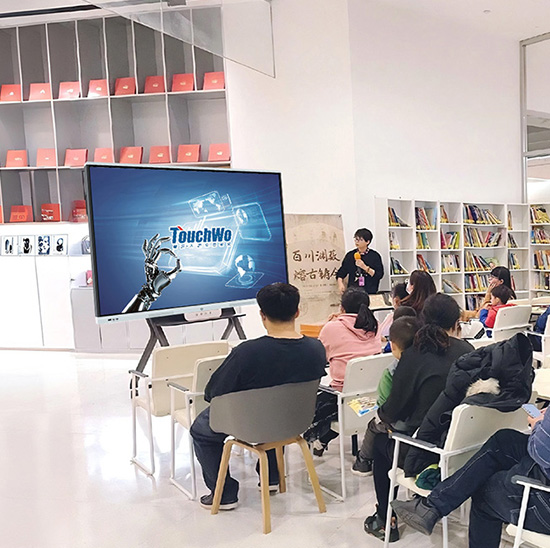
No cenário em evolução da educação moderna – onde o envolvimento dos alunos, aprendizagem interativa, e a integração tecnológica são fundamentais para um ensino eficaz -Telas sensíveis ao toque para quadros interativos (Escolas/Faculdades) tornaram-se uma ferramenta indispensável. Ao contrário dos quadros brancos tradicionais ou dos projetores básicos que limitam a interação, essas telas sensíveis ao toque especializadas transformam aulas estáticas em dinâmicas, experiências colaborativas. Para professores e professores de escolas de ensino fundamental e médio e instituições de ensino superior, eles permitem anotações em tempo real, integração multimídia, e participação dos alunos, tudo isso ao mesmo tempo em que resiste aos rigores do uso diário em sala de aula. Seja instalado em salas de aula do ensino fundamental, laboratórios de ciências do ensino médio, ou salas de aula de faculdade, A tela sensível ao toque do quadro branco interativo preenche a lacuna entre educadores e alunos nativos digitais, promovendo a aprendizagem ativa e a retenção de conhecimento.
Este artigo explora seus principais recursos, principais aplicações, e benefícios transformadores, ajudando administradores escolares e educadores a selecionar soluções de tela sensível ao toque que elevem a eficácia do ensino e o envolvimento dos alunos.
Principais recursos da tela sensível ao toque para quadros interativos (Escolas/Faculdades)
1. Multitoque & Interação Colaborativa
A vantagem definidora do quadro branco interativo com tela sensível ao toque é sua capacidade de suportar dinâmicas, aprendizagem colaborativa – fundamental para envolver os alunos modernos:
Suporte de toque multiusuário: Até 10 pontos de contato simultâneos permitem atividades em grupo (por exemplo., alunos resolvendo problemas de matemática juntos) ou colaboração ponto a ponto em projetos.
Controle de gestos naturais: Gestos intuitivos (zoom, girar, arrastar) espelhar uso de smartphone/tablet, reduzindo as curvas de aprendizagem para estudantes e professores familiarizados com tecnologia de consumo.
Anotação sensível à pressão: Simula efeitos de caneta e marcador (grossura, mistura de cores) para anotações precisas, desenhando diagramas, ou destacando texto em materiais digitais.
2. Durável & Design pronto para sala de aula
Ambientes educacionais exigem equipamentos que resistam ao uso frequente, impactos acidentais, e uso diário - e essas telas sensíveis ao toque oferecem:
Vidro temperado resistente a riscos: 4mm de espessura, vidro anti-reflexo resiste a arranhões de marcadores, fricção de borracha, e choques acidentais de mochilas ou equipamentos de sala de aula.
Seguro para crianças & construção robusta: Bordas arredondadas, vidro inquebrável, e estruturas robustas atendem aos padrões de segurança para uso K-12, enquanto superfícies resistentes a derramamentos (Classificação IP54) lidar com derramamentos acidentais de líquidos (por exemplo., água, suco).
Desempenho duradouro: Componentes de nível industrial garantem 50,000+ horas de uso contínuo (6+ anos de operação diária em sala de aula), reduzindo a frequência e os custos de substituição.
3. Integração perfeita de conteúdo educacional
Essas telas sensíveis ao toque são sincronizadas com as ferramentas nas quais os educadores confiam para criar e ministrar aulas:
Compatibilidade com plataforma de aprendizagem: Funciona com software educacional líder (por exemplo., Google Sala de Aula, Microsoft Teams para Educação, Tela, Conjunto de aprendizagem SMART) para exibir e interagir com planos de aula, atribuições, e livros digitais.
Suporte multimídia: Reproduz vídeos diretamente (por exemplo., documentários educativos), clipes de áudio (por exemplo., gravações de linguagem), e simulações interativas (por exemplo., experimentos científicos) sem dispositivos externos.
Conectividade do dispositivo: Conecta-se sem fio aos laptops dos professores, comprimidos, ou dispositivos dos alunos (via Wi-Fi/Bluetooth) para espelhamento de tela, compartilhamento de conteúdo, ou envios de alunos.
4. Acessível & Recursos de aprendizagem inclusiva
Para atender às diversas necessidades dos alunos e estilos de aprendizagem, essas telas sensíveis ao toque priorizam a acessibilidade:
Alta visibilidade & legibilidade: 500+ O brilho das lêndeas e as altas taxas de contraste garantem uma visibilidade nítida mesmo em salas de aula bem iluminadas, com tamanhos de fonte ajustáveis para alunos com deficiência visual.
Integração de ferramentas de acessibilidade: Compatível com leitores de tela (por exemplo., MAXILAS), software de fala para texto, e ferramentas de legenda oculta para apoiar alunos com deficiência.
Suporte multilíngue: Troca de idioma com um toque (20+ idiomas) e recursos de tradução atendem a diversas populações estudantis (por exemplo., Alunos de ESL no ensino fundamental e médio ou estudantes internacionais em faculdades).
5. Fácil de usar & Operação de baixa manutenção
Para educadores ocupados e equipes de TI escolares, essas telas sensíveis ao toque minimizam o tempo de configuração e manutenção:
Funcionalidade plug-and-play: Conectividade simples com projetores, caixas de som, ou impressoras, com interfaces de software intuitivas que exigem treinamento mínimo (30 minutos ou menos para professores).
Gerenciamento remoto: Administradores de TI atualizam software, solucionar problemas, ou envie modelos de aula para vários quadros brancos por meio de um painel central, reduzindo as necessidades de suporte no local.
Desempenho com eficiência energética: Desligamento automático (depois 15 minutos de inatividade) e modos de baixo consumo reduzem o consumo de energia, alinhando-se com as metas de sustentabilidade da escola.
Principais aplicações da tela sensível ao toque do quadro branco interativo em escolas/faculdades
1. Salas de aula K-12 (Ensino fundamental ao ensino médio)
Nas configurações de ensino fundamental e médio, essas telas sensíveis ao toque tornam as aulas envolventes e adequadas à idade dos jovens alunos:
Ensino fundamental: Jogos interativos (por exemplo., correspondência alfabética, quebra-cabeças numéricos) e animações coloridas transformam o aprendizado fundamental em diversão, aumentando a retenção de jovens estudantes.
Disciplinas do ensino fundamental/médio: Professores de ciências usam modelos e simulações 3D (por exemplo., estruturas celulares, reações químicas) para explicar conceitos complexos; professores de matemática anotam gráficos e equações em tempo real.
Aprendizagem remota/híbrida: Integra-se com ferramentas de videoconferência (por exemplo., Zoom, Google Meet) para transmitir aulas interativas, permitir que alunos presenciais e remotos participem igualmente.
2. Salas de aula universitárias & Ensino superior
Para o ensino pós-secundário, essas telas sensíveis ao toque suportam ensino avançado e instrução em grandes grupos:
Entrega de palestras: Professores anotam slides de palestras, desenhar diagramas complexos (por exemplo., esquemas de engenharia, modelos econômicos), e destaque os pontos principais em tempo real, mantendo turmas grandes envolvidas.
Pesquisa colaborativa: Alunos de pós-graduação e professores usam recursos multitoque para colaborar na análise de dados, planejamento do projeto, ou trabalho de tese durante sessões de grupo.
Programas profissionais: Médico, enfermagem, ou escolas de design usam telas de alta resolução para exibir imagens detalhadas (por exemplo., diagramas anatômicos, projetos de design) com ferramentas de anotação precisas.
3. Ambientes de aprendizagem especializados
Em salas de aula e laboratórios especializados, essas telas sensíveis ao toque aprimoram o aprendizado prático e técnico:
Laboratórios de ciências: Exibir procedimentos de experimento, registrar dados em tempo real, e comparar resultados com conjuntos de dados digitais (por exemplo., cálculos de força física, guias de dissecação de biologia).
Arte & aulas de design: O toque sensível à pressão suporta desenho digital, pintura, e trabalho de design, com compatibilidade com software criativo (por exemplo., Adobe Photoshop, Procriar).
Aulas de idiomas: Reproduzir clipes de áudio, exibir guias de pronúncia, e permitir que os alunos gravem e comparem sua fala com a de falantes nativos, melhorando a proficiência no idioma.
4. Bibliotecas escolares & Espaços de estudo
Em áreas de aprendizagem compartilhadas, essas telas sensíveis ao toque servem como centros colaborativos para os alunos:
Trabalho de projeto em grupo: Os alunos usam recursos multitoque para co-criar apresentações, editar documentos, ou debater ideias sem se concentrar em um único dispositivo.
Assistência à investigação: Acesse bibliotecas digitais, bancos de dados educacionais, ou vídeos tutoriais para apoiar o estudo independente e ajuda com a lição de casa.
Aulas particulares: Tutores usam a tela para explicar conceitos, resolver problemas, e fornecer feedback em tempo real aos colegas.
Benefícios da tela sensível ao toque para quadros interativos (Escolas/Faculdades)
1. Maior envolvimento dos alunos & Participação
A aprendizagem passiva tradicional leva ao desligamento – essas telas sensíveis ao toque impulsionam o envolvimento ativo:
Aulas interativas e atividades multitoque aumentam a participação dos alunos 60% vs.. quadros brancos tradicionais, com 75% dos alunos relatam maior interesse nos tópicos da aula.
Colaboração liderada por estudantes (por exemplo., resolução de problemas em grupo na tela) aumenta a confiança e as habilidades de comunicação, fundamental para o sucesso acadêmico e profissional.
2. Maior flexibilidade de ensino & Eficácia
Os educadores ganham ferramentas para adaptar as aulas a diversos estilos e necessidades de aprendizagem:
Integração multimídia (vídeos, simulações, questionários interativos) atende ao visual, auditivo, e alunos cinestésicos, melhorando a retenção de conhecimento por 40%.
Modelos de aula pré-construídos e anotações fáceis economizam aos professores de 2 a 3 horas semanais na preparação das aulas, liberando tempo para suporte individualizado ao aluno.
3. Melhores resultados de aprendizagem & Retenção de Conhecimento
Ativo, aprendizagem interativa se traduz diretamente em melhor desempenho acadêmico:
Os alunos que aprendem com telas sensíveis ao toque do quadro interativo obtêm notas de 15 a 20% mais altas em testes e tarefas, à medida que a interação prática aprofunda a compreensão de conceitos complexos.
As anotações digitais e o fácil compartilhamento de conteúdo permitem que os alunos revisem as aulas após a aula, reforçando a aprendizagem e reduzindo o risco de perda de informação.
4. Economia de custos & Valor de longo prazo
Embora seja um investimento inicial, essas telas sensíveis ao toque proporcionam economia de longo prazo para escolas e faculdades:
Elimina custos com papel, marcadores, borrachas, e suprimentos tradicionais para quadros brancos, cortando despesas anuais com salas de aula 30%.
O design durável e a longa vida útil reduzem os custos de substituição, com a maioria dos modelos superando os projetores/quadros brancos tradicionais em 2 a 3 anos.
Perguntas frequentes sobre tela sensível ao toque para quadros interativos (Escolas/Faculdades)
1º trimestre: Os professores precisarão de treinamento extensivo para usar essas telas sensíveis ao toque??
A1: Não. A interface é intuitiva, com controles de gestos familiares (como smartphones/tablets). Oferecemos uma sessão de treinamento de 30 minutos e tutoriais on-line gratuitos – a maioria dos professores domina as funções básicas desde o primeiro dia.
2º trimestre: A tela sensível ao toque pode funcionar com nosso software educacional existente? (por exemplo., Google Sala de Aula, Tela)?
A2: Sim. Projetamos nossas telas para integração perfeita com todas as principais plataformas e softwares educacionais. Nossa equipe testa a compatibilidade e configura a integração para garantir uma entrega tranquila das aulas.
3º trimestre: A tela é durável o suficiente para alunos do ensino fundamental (por exemplo., arranhões acidentais, derramamentos)?
A3: Absolutamente. O vidro temperado de 4mm, revestimento resistente a riscos, e resistência a derramamentos IP54 são construídos para uso K-12. Testamos telas para suportar 100,000+ toques e pequenos impactos.
4º trimestre: Vários alunos podem usar a tela ao mesmo tempo para atividades em grupo??
A4: Sim. Todos os modelos suportam até 10 pontos de contato simultâneos, permitindo que pequenos grupos colaborem em problemas, projetos, ou apresentações sem revezar.
Q5: Qual cobertura de garantia essas telas sensíveis ao toque do quadro interativo incluem?
A5: Todos os modelos vêm com garantia de 5 anos cobrindo defeitos de hardware, capacidade de resposta ao toque, e problemas de exibição – mais do que a média do setor (3 anos). Garantias estendidas de 7 anos estão disponíveis para ambientes de alto uso.
Conclusão
A tela sensível ao toque do quadro branco interativo é um investimento transformador para escolas e faculdades, transformando salas de aula estáticas em dinâmicas, espaços de aprendizagem centrados no aluno. Ao promover a colaboração, apoiando diversos estilos de aprendizagem, e simplificando a entrega das aulas, eles capacitam os educadores a ensinar de forma mais eficaz e os alunos a aprender mais ativamente. Para administradores escolares que buscam aprimorar a integração tecnológica, aumentar o envolvimento, e melhorar os resultados de aprendizagem, essas telas sensíveis ao toque oferecem valor imediato e benefícios acadêmicos de longo prazo. Seja nas salas de aula do ensino fundamental, salas de aula da faculdade, ou laboratórios especializados, As telas sensíveis ao toque do quadro branco interativo estão redefinindo o que é possível na educação moderna.
Pronto para atualizar as salas de aula da sua escola ou faculdade com telas sensíveis ao toque de quadro branco interativo de alto desempenho? Preencha o formulário em nosso site para se conectar com nossos especialistas em tecnologia educacional. Avaliaremos seu ambiente de aprendizagem, demonstre integração com seu software existente, e fornecer um personalizado proposta de solução – ajudando você a criar soluções envolventes, experiências de aprendizagem eficazes para seus alunos.