
Trong bối cảnh phát triển của giáo dục hiện đại—nơi mà sự tham gia của học sinh, học tập tương tác, và tích hợp công nghệ là chìa khóa để giảng dạy hiệu quả—Màn hình cảm ứng cho bảng trắng tương tác (Trường học/cao đẳng) đã trở thành một công cụ không thể thiếu. Không giống như bảng trắng truyền thống hay máy chiếu cơ bản hạn chế sự tương tác, những màn hình cảm ứng chuyên dụng này biến các bài học tĩnh thành động, kinh nghiệm hợp tác. Dành cho giáo viên và giáo sư trên khắp các trường K-12 và các cơ sở giáo dục đại học, họ kích hoạt chú thích thời gian thực, tích hợp đa phương tiện, và sự tham gia của học sinh—trong khi vẫn chịu được sự khắc nghiệt của việc sử dụng lớp học hàng ngày. Dù được lắp đặt trong các lớp học tiểu học, phòng thí nghiệm khoa học trung học, hoặc giảng đường đại học, Màn hình cảm ứng bảng trắng tương tác thu hẹp khoảng cách giữa các nhà giáo dục và sinh viên bản xứ kỹ thuật số, thúc đẩy hoạt động học tập tích cực và ghi nhớ kiến thức.
Bài viết này khám phá các tính năng cốt lõi của họ, ứng dụng chính, và lợi ích biến đổi, giúp các quản trị viên trường học và nhà giáo dục lựa chọn các giải pháp màn hình cảm ứng nhằm nâng cao hiệu quả giảng dạy và sự tham gia của học sinh.
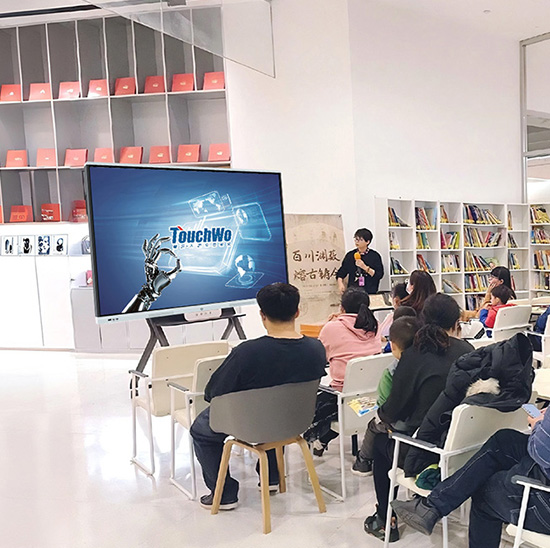
Các tính năng cốt lõi của màn hình cảm ứng cho bảng trắng tương tác (Trường học/cao đẳng)
1. Cảm ứng đa điểm & Tương tác hợp tác
Ưu điểm nổi bật của Màn hình cảm ứng bảng trắng tương tác là khả năng hỗ trợ động, học tập hợp tác—rất quan trọng để thu hút học sinh hiện đại:
Hỗ trợ cảm ứng đa người dùng: Lên đến 10 điểm tiếp xúc đồng thời cho phép hoạt động nhóm (ví dụ., học sinh cùng nhau giải các bài toán) hoặc cộng tác ngang hàng trong các dự án.
Kiểm soát cử chỉ tự nhiên: Cử chỉ trực quan (phóng, quay, lôi kéo) gương sử dụng điện thoại thông minh/máy tính bảng, giảm đường cong học tập cho học sinh và giáo viên quen thuộc với công nghệ tiêu dùng.
Chú thích nhạy áp lực: Mô phỏng hiệu ứng bút và bút đánh dấu (độ dày, pha trộn màu sắc) để ghi chép chính xác, vẽ sơ đồ, hoặc làm nổi bật văn bản trong tài liệu kỹ thuật số.
2. Bền bỉ & Thiết kế sẵn sàng cho lớp học
Môi trường giáo dục đòi hỏi thiết bị có thể chịu được việc sử dụng thường xuyên, tác động ngẫu nhiên, và trang phục hàng ngày—và những màn hình cảm ứng này mang lại:
Kính cường lực chống xước: 4mm dày, kính chống chói chống trầy xước đánh dấu, tẩy ma sát, và va chạm vô tình từ ba lô hoặc thiết bị lớp học.
An toàn cho trẻ em & xây dựng mạnh mẽ: Các cạnh tròn, kính chống vỡ, và khung chắc chắn đáp ứng các tiêu chuẩn an toàn khi sử dụng K-12, trong khi bề mặt chống tràn (Xếp hạng IP54) xử lý sự cố tràn chất lỏng vô tình (ví dụ., Nước, nước ép).
Hiệu suất lâu dài: Các thành phần cấp công nghiệp đảm bảo 50,000+ giờ sử dụng liên tục (6+ năm hoạt động lớp học hàng ngày), giảm tần suất và chi phí thay thế.
3. Tích hợp nội dung giáo dục liền mạch
Những màn hình cảm ứng này đồng bộ hóa với các công cụ mà nhà giáo dục sử dụng để tạo và giảng dạy:
Khả năng tương thích nền tảng học tập: Làm việc với phần mềm giáo dục hàng đầu (ví dụ., Lớp học Google, Nhóm Microsoft dành cho giáo dục, Vải bạt, Bộ học tập SMART) để hiển thị và tương tác với kế hoạch bài học, bài tập, và sách giáo khoa kỹ thuật số.
Hỗ trợ đa phương tiện: Trực tiếp phát video (ví dụ., phim tài liệu giáo dục), clip âm thanh (ví dụ., ghi âm ngôn ngữ), và mô phỏng tương tác (ví dụ., thí nghiệm khoa học) không có thiết bị bên ngoài.
Kết nối thiết bị: Kết nối không dây với máy tính xách tay của giáo viên, máy tính bảng, hoặc thiết bị của học sinh (qua Wi-Fi/Bluetooth) để phản chiếu màn hình, chia sẻ nội dung, hoặc bài nộp của sinh viên.
4. Có thể truy cập & Tính năng học tập hòa nhập
Để đáp ứng nhu cầu và phong cách học tập đa dạng của sinh viên, những màn hình cảm ứng này ưu tiên khả năng tiếp cận:
Khả năng hiển thị cao & khả năng đọc được: 500+ độ sáng nits và tỷ lệ tương phản cao đảm bảo khả năng hiển thị rõ ràng ngay cả trong các lớp học có đủ ánh sáng, với kích thước phông chữ có thể điều chỉnh cho học sinh khiếm thị.
Tích hợp công cụ trợ năng: Tương thích với trình đọc màn hình (ví dụ., hàm), phần mềm chuyển giọng nói thành văn bản, và các công cụ phụ đề để hỗ trợ học sinh khuyết tật.
Hỗ trợ đa ngôn ngữ: Chuyển đổi ngôn ngữ một chạm (20+ ngôn ngữ) và các tính năng dịch thuật phục vụ cho các nhóm sinh viên đa dạng (ví dụ., Người học ESL ở K-12 hoặc sinh viên quốc tế ở trường cao đẳng).
5. Dễ sử dụng & Hoạt động bảo trì thấp
Dành cho các nhà giáo dục bận rộn và đội ngũ CNTT của trường học, những màn hình cảm ứng này giảm thiểu thời gian thiết lập và bảo trì:
Chức năng cắm và chạy: Kết nối đơn giản với máy chiếu, loa, hoặc máy in, với giao diện phần mềm trực quan yêu cầu đào tạo tối thiểu (30 phút hoặc ít hơn cho giáo viên).
Quản lý từ xa: Quản trị viên CNTT cập nhật phần mềm, khắc phục sự cố, hoặc đẩy các mẫu bài học lên nhiều bảng trắng thông qua bảng điều khiển trung tâm, giảm nhu cầu hỗ trợ tại chỗ.
Hiệu suất tiết kiệm năng lượng: Tự động tắt nguồn (sau đó 15 số phút không hoạt động) và chế độ năng lượng thấp cắt giảm mức tiêu thụ năng lượng, phù hợp với mục tiêu bền vững của trường học.
Các ứng dụng chính của Màn hình cảm ứng bảng trắng tương tác trong trường học/cao đẳng
1. Lớp học K-12 (Tiểu học đến trung học)
Trong cài đặt K-12, những màn hình cảm ứng này làm cho bài học trở nên hấp dẫn và phù hợp với lứa tuổi đối với học sinh nhỏ tuổi:
Giáo dục tiểu học: Trò chơi tương tác (ví dụ., khớp bảng chữ cái, câu đố về số) và các hình ảnh động đầy màu sắc biến việc học cơ bản thành trò chơi, tăng cường khả năng giữ chân cho sinh viên trẻ.
Các môn học cấp THCS/THPT: Giáo viên khoa học sử dụng mô hình và mô phỏng 3D (ví dụ., cấu trúc tế bào, phản ứng hóa học) để giải thích các khái niệm phức tạp; giáo viên toán chú thích đồ thị và phương trình trong thời gian thực.
Học từ xa/kết hợp: Tích hợp với các công cụ hội nghị truyền hình (ví dụ., Phóng, Google Meet) để truyền phát các bài học tương tác, cho phép học sinh trực tiếp và học sinh từ xa tham gia bình đẳng.
2. Giảng đường đại học & Giáo dục đại học
Đối với giáo dục sau trung học, những màn hình cảm ứng này hỗ trợ việc giảng dạy nâng cao và hướng dẫn nhóm lớn:
giảng bài: Giảng viên chú thích slide bài giảng, vẽ sơ đồ phức tạp (ví dụ., sơ đồ kỹ thuật, mô hình kinh tế), và làm nổi bật những điểm chính trong thời gian thực, duy trì sự tham gia của các lớp học lớn.
Nghiên cứu hợp tác: Sinh viên tốt nghiệp và giảng viên sử dụng tính năng cảm ứng đa điểm để cộng tác phân tích dữ liệu, lập kế hoạch dự án, hoặc làm luận văn trong các buổi học nhóm.
Chương trình chuyên nghiệp: Thuộc về y học, điều dưỡng, hoặc các trường thiết kế sử dụng màn hình có độ phân giải cao để hiển thị hình ảnh chi tiết (ví dụ., sơ đồ giải phẫu, bản thiết kế thiết kế) với các công cụ chú thích chính xác.
3. Môi trường học tập chuyên biệt
Trong các lớp học và phòng thí nghiệm chuyên ngành, những màn hình cảm ứng này nâng cao khả năng học tập thực hành và kỹ thuật:
Phòng thí nghiệm khoa học: Hiển thị quy trình thử nghiệm, ghi lại dữ liệu trong thời gian thực, và so sánh kết quả với bộ dữ liệu số (ví dụ., tính toán lực vật lý, hướng dẫn giải phẫu sinh học).
Nghệ thuật & lớp học thiết kế: Cảm ứng nhạy áp lực hỗ trợ vẽ kỹ thuật số, bức vẽ, và công việc thiết kế, có khả năng tương thích với phần mềm sáng tạo (ví dụ., Adobe Photoshop, sinh sản).
Phòng học ngoại ngữ: Phát clip âm thanh, hiển thị hướng dẫn phát âm, và để học sinh ghi âm và so sánh lời nói của mình với người bản ngữ, nâng cao trình độ ngôn ngữ.
4. Thư viện trường học & Không gian học tập
Trong các khu vực học tập chung, những màn hình cảm ứng này đóng vai trò là trung tâm hợp tác cho sinh viên:
Làm việc dự án nhóm: Học sinh sử dụng tính năng cảm ứng đa điểm để cùng tạo bài thuyết trình, chỉnh sửa tài liệu, hoặc lên ý tưởng mà không cần phải loay hoay quanh một thiết bị duy nhất.
Hỗ trợ nghiên cứu: Truy cập thư viện kỹ thuật số, cơ sở dữ liệu giáo dục, hoặc các video hướng dẫn để hỗ trợ việc học tập độc lập và trợ giúp làm bài tập về nhà.
Dạy kèm đồng đẳng: Giáo viên sử dụng màn hình để giải thích các khái niệm, giải quyết vấn đề, và cung cấp phản hồi theo thời gian thực cho đồng nghiệp.
Lợi ích của màn hình cảm ứng cho bảng trắng tương tác (Trường học/cao đẳng)
1. Tăng sự tham gia của sinh viên & Sự tham gia
Học tập thụ động truyền thống dẫn đến sự thảnh thơi—những màn hình cảm ứng này thúc đẩy sự tham gia tích cực:
Các bài học tương tác và các hoạt động đa chạm tăng cường sự tham gia của học sinh bằng cách 60% vs. bảng trắng truyền thống, với 75% học sinh báo cáo sự quan tâm cao hơn đến các chủ đề của lớp học.
Hợp tác do sinh viên lãnh đạo (ví dụ., nhóm giải quyết vấn đề trên màn hình) tăng cường sự tự tin và kỹ năng giao tiếp, quan trọng cho sự thành công trong học tập và nghề nghiệp.
2. Tăng cường tính linh hoạt trong giảng dạy & Hiệu quả
Nhà giáo dục có được các công cụ để điều chỉnh bài học cho phù hợp với phong cách và nhu cầu học tập đa dạng:
Tích hợp đa phương tiện (video, mô phỏng, câu đố tương tác) phục vụ cho thị giác, thính giác, và người học vận động, nâng cao khả năng ghi nhớ kiến thức bằng cách 40%.
Các mẫu bài học dựng sẵn và chú thích dễ dàng giúp giáo viên tiết kiệm 2–3 giờ mỗi tuần khi chuẩn bị bài học, dành thời gian rảnh để hỗ trợ cá nhân sinh viên.
3. Kết quả học tập được cải thiện & Lưu giữ kiến thức
Tích cực, học tập tương tác trực tiếp chuyển thành kết quả học tập tốt hơn:
Học sinh học bằng màn hình cảm ứng bảng trắng tương tác đạt điểm cao hơn 15–20% trong các bài kiểm tra và bài tập, khi tương tác thực hành giúp hiểu sâu hơn về các khái niệm phức tạp.
Ghi chú kỹ thuật số và chia sẻ nội dung dễ dàng cho phép học sinh xem lại bài học sau giờ học, củng cố việc học và giảm nguy cơ bỏ lỡ thông tin.
4. Tiết kiệm chi phí & Giá trị lâu dài
Trong khi đầu tư ban đầu, những màn hình cảm ứng này mang lại khoản tiết kiệm dài hạn cho các trường học và cao đẳng:
Loại bỏ chi phí cho giấy, đánh dấu, tẩy, và các vật dụng bảng trắng truyền thống, cắt giảm chi phí lớp học hàng năm bằng cách 30%.
Thiết kế bền bỉ và tuổi thọ dài giúp giảm chi phí thay thế, với hầu hết các mẫu máy có tuổi thọ cao hơn máy chiếu/bảng trắng truyền thống từ 2–3 năm.
Câu hỏi thường gặp về màn hình cảm ứng cho bảng trắng tương tác (Trường học/cao đẳng)
Q1: Giáo viên có cần được đào tạo chuyên sâu để sử dụng những màn hình cảm ứng này không?
A1: KHÔNG. Giao diện trực quan, với các điều khiển cử chỉ quen thuộc (như điện thoại thông minh/máy tính bảng). Chúng tôi cung cấp một buổi đào tạo kéo dài 30 phút và hướng dẫn trực tuyến miễn phí—hầu hết giáo viên đều nắm vững các chức năng cơ bản vào ngày đầu tiên.
Q2: Màn hình cảm ứng có thể hoạt động với phần mềm giáo dục hiện tại của chúng tôi không (ví dụ., Lớp học Google, Vải bạt)?
A2: Đúng. Chúng tôi thiết kế màn hình của mình để tích hợp hoàn hảo với tất cả các nền tảng và phần mềm giáo dục hàng đầu. Nhóm của chúng tôi kiểm tra khả năng tương thích và thiết lập tích hợp để đảm bảo việc giảng dạy diễn ra suôn sẻ.
Q3: Màn hình có đủ bền cho học sinh tiểu học không? (ví dụ., vết xước vô tình, đổ tràn)?
A3: Tuyệt đối. Kính cường lực 4mm, lớp phủ chống trầy xước, và khả năng chống tràn IP54 được thiết kế để sử dụng cho K-12. Chúng tôi kiểm tra khả năng chịu đựng của màn hình 100,000+ chạm và tác động nhỏ.
Q4: Nhiều học sinh có thể sử dụng màn hình cùng lúc cho hoạt động nhóm không?
A4: Đúng. Tất cả các mô hình hỗ trợ lên đến 10 điểm tiếp xúc đồng thời, để các nhóm nhỏ cộng tác giải quyết các vấn đề, dự án, hoặc thuyết trình mà không thay phiên nhau.
Q5: Những màn hình cảm ứng bảng trắng tương tác này bao gồm phạm vi bảo hành gì?
A5: Tất cả các model đều được bảo hành 5 năm bao gồm các lỗi phần cứng, khả năng phản hồi của cảm ứng, và hiển thị các vấn đề—dài hơn mức trung bình của ngành (3 năm). Bảo hành mở rộng 7 năm có sẵn cho môi trường sử dụng nhiều.
Phần kết luận
Màn hình cảm ứng bảng trắng tương tác là một khoản đầu tư mang tính thay đổi cho các trường học và cao đẳng, biến lớp học tĩnh thành động, không gian học tập lấy học sinh làm trung tâm. Bằng cách thúc đẩy sự hợp tác, hỗ trợ các phong cách học tập đa dạng, và đơn giản hóa việc giảng dạy, chúng trao quyền cho các nhà giáo dục giảng dạy hiệu quả hơn và học sinh học tập tích cực hơn. Dành cho các quản trị viên trường học muốn tăng cường tích hợp công nghệ, tăng cường sự tham gia, và nâng cao kết quả học tập, những màn hình cảm ứng này mang lại giá trị tức thì và lợi ích học tập lâu dài. Cho dù trong lớp học tiểu học, giảng đường đại học, hoặc phòng thí nghiệm chuyên ngành, Màn hình cảm ứng bảng trắng tương tác đang định nghĩa lại những gì có thể thực hiện được trong giáo dục hiện đại.
Sẵn sàng nâng cấp các lớp học ở trường hoặc đại học của bạn bằng màn hình cảm ứng bảng trắng tương tác hiệu suất cao? Điền vào biểu mẫu trên trang web của chúng tôi để kết nối với các chuyên gia công nghệ giáo dục của chúng tôi. Chúng tôi sẽ đánh giá môi trường học tập của bạn, chứng minh sự tích hợp với phần mềm hiện có của bạn, và cung cấp một tùy chỉnh đề xuất giải pháp—giúp bạn tạo ra sự hấp dẫn, kinh nghiệm học tập hiệu quả cho học sinh.





