บ้าน

>

Power on

Power on

สารบัญ

There are 2 วิธีการ:
The jumper cap method is more stable and recommended by default.
If using BIOS settings, they will reset if the BIOS is restored or the battery runs out.

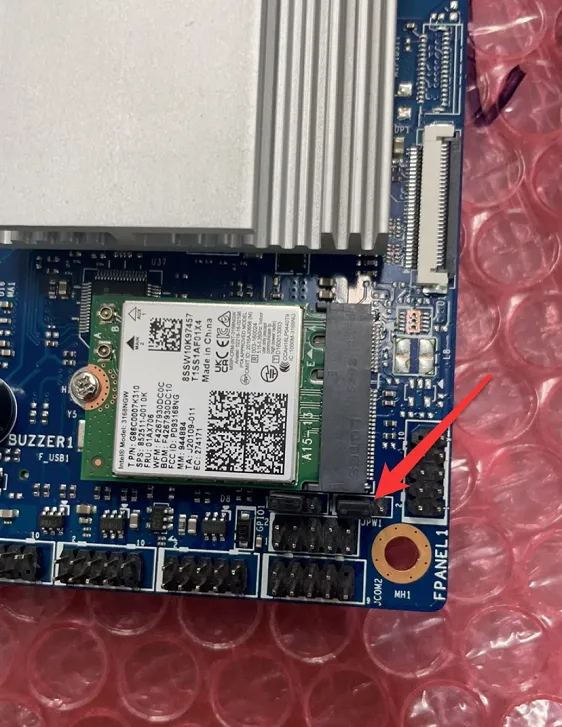
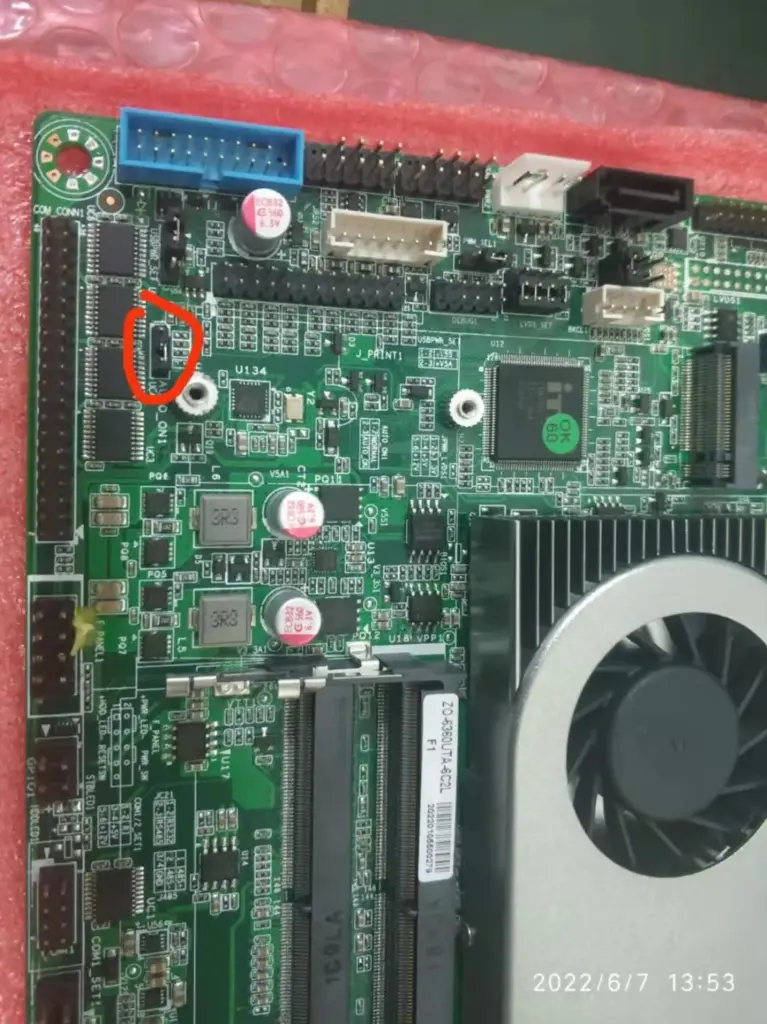
Power on via hardware jumper cap.

(3 pins: move the jumper cap from pins 1-2 to pins 2-3)

4th Gen Intel Core i3, 4th Gen Intel Core i5
    图片1

    J1900

    图片2

    N5095

    图片3

    I5-6360

    图片4

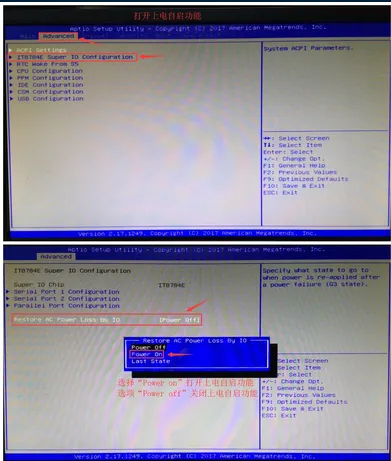
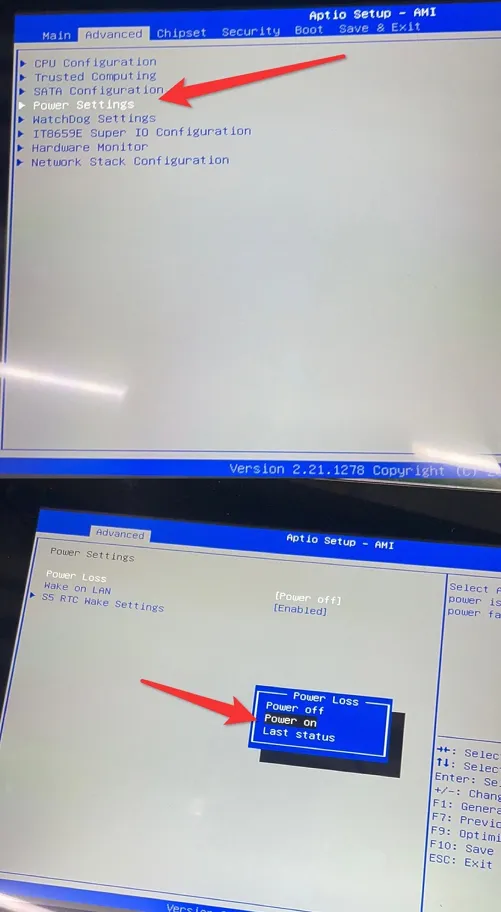
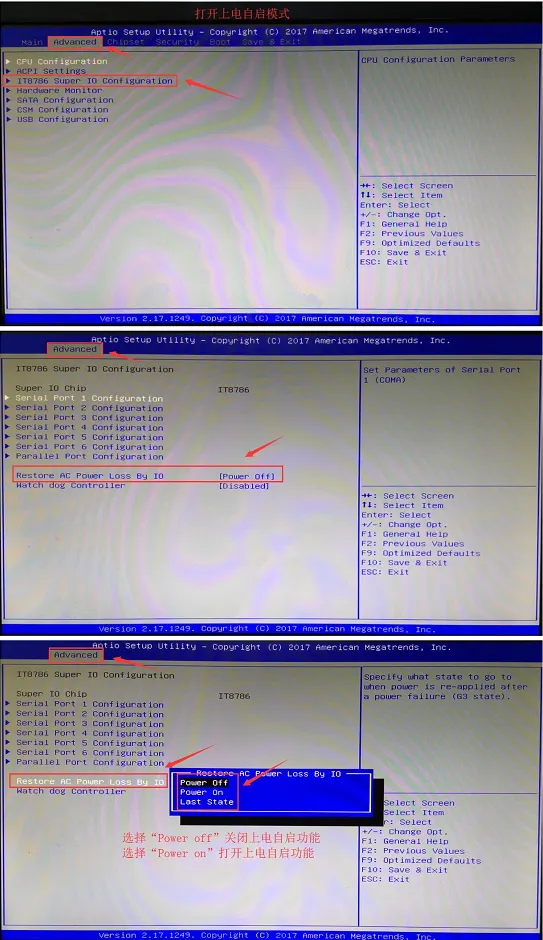
    Power on via BIOS
    (Press the Delete key repeatedly during startup to enter BIOS.)

    I3\I5

    图片5

    J1900

    图片6

    N5095

    图片7

    S35-1900

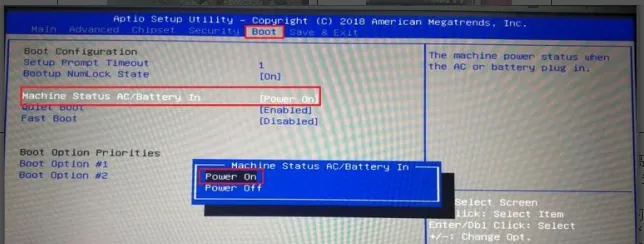
    In the top option Advanced of the BIOS, select ACPI Settings to enter.
    Select PWRON After Power Loss to access the submenu, then choose Always On in the pop-up menu.
    Press F4 and then Enter to save and exit.
    (บันทึก: Settings may vary by motherboard. On some motherboards,PWRON After Power Loss is directly located in the Advanced menu.)

    8350
    图片8

    แบ่งปัน:

    ส่งข้อความถึงเรา

      บทความที่เกี่ยวข้อง

      Karaoke System Touch Screen

      หน้าจอสัมผัสสำหรับเกมอาร์เคด: ชื่อคลาสสิก/สมัยใหม่

      คาราโอเกะที่บ้านคือความสนุก, ความสะดวก, และความดื่มด่ำ—เปลี่ยนห้องนั่งเล่นให้เป็นพื้นที่ส่วนตัวสำหรับครอบครัวและเพื่อนฝูง. รีโมทควบคุมยังเทอะทะ, หน้าจอเนื้อเพลงที่อ่านยาก,

      Self-Ordering

      เพิ่มประสิทธิภาพคำสั่งซื้อร้านอาหารด้วยเครื่องสั่งอาหารด้วยตนเอง GD32C3

      ร้านอาหารต้องเผชิญกับความกดดันอย่างต่อเนื่องในช่วงเวลารับประทานอาหารที่มีผู้คนหนาแน่น. คิวยาว, การรับคำสั่งซื้อด้วยตนเอง, และความพร้อมของพนักงานที่จำกัดล้วนส่งผลต่อประสบการณ์ของลูกค้า. สำหรับโครงการนี้,

      Caucasian Female Worker Supervising Recycling Process

      วิธีที่ระบบสัมผัสทางอุตสาหกรรมช่วยปรับปรุง OEE และลดการหยุดทำงาน?

      เพิ่ม OEE และลดเวลาหยุดทำงานด้วยจอแสดงผลระบบสัมผัสทางอุตสาหกรรมที่ทนทาน. เพิ่มการมองเห็นและคุณภาพการผลิตของคุณวันนี้ด้วย Touchwo.

      สารบัญ