
People interact with interactive devices every single day. Traditional displays rely on separate mice and keyboards to receive commands. These extra tools take up space and slow down simple operations.A touch screen changes this situation completely.
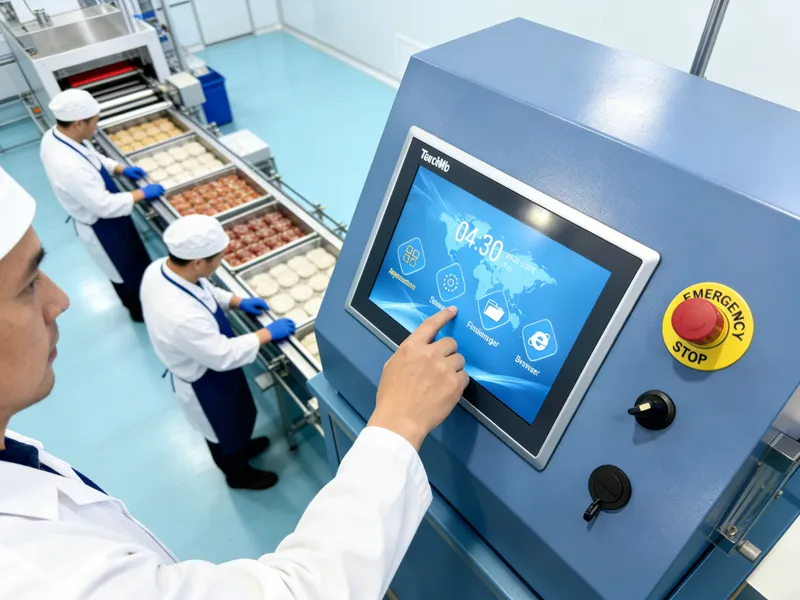
It combines visual display and touch sensing into one single part. Besides easy operation, it also boosts efficiency for commercial, industrial and public equipment. This guide shares the basic definition, working logic, main types, strengths and real-world uses of a touch screen.
Basic Definition of a Touch Screen
A touch screen is an integrated interactive display component. It shows images and accepts direct physical input from users at the same time.
1. Combined display and sensing design
A standard touch screen has two core layers. One layer delivers clear visual content. The other layer captures touch signals from fingers or tools. They work as a unified whole.
2. Direct human-machine interaction
Users tap, slide or press the screen surface to send commands. They skip extra input accessories. This simple mode lowers the learning cost for all users.
3. Wide scenario adaptability
Touch screens come in many sizes and grades. Light-duty versions fit daily consumer devices. Heavy-duty models serve industrial machines and public terminals.
How a Standard Touch Screen Functions
Every touch screen follows a steady cycle to process each touch action. The whole process takes only a few milliseconds.
1. Generate effective touch signals
Eerstens, physical contact changes the screen’s inner state. Different screen styles create electric shifts, pressure changes or light blockages. These become valid signals.
2. Capture accurate position data
Volgende, built-in sensors detect tiny changes instantly. They calculate the exact spot where the touch happens. They also track sliding movements in real time.
3. Filter useless interference
Toe, internal chips sort out false signals from dust or light bumps. They keep only real operation data. This step prevents wrong responses during use.
4. Execute commands and feedback
Uiteindelik, the main device runs the matched function. The screen refreshes content to confirm the action. This finishes one full interaction loop.
Main Types of Touch Screens and Their Features
Different touch screen styles use unique induction technology. Each type fits specific working environments.
1. Kapasitiewe raakskerm
This style senses weak electric current from human fingers. It offers fast response and smooth multi-touch experience. Dus, it dominates commercial terminals and daily smart devices.
2. Resistiewe raakskerm
It reacts to direct physical pressure. It works well with bare fingers, gloves and styluses. It is a top choice for dusty, humid industrial workshops.
3. Infrarooi raakskerm
It builds an invisible light grid around the screen frame. Any solid object can trigger a response. It has strong anti-damage ability for large public display screens.
4. Surface acoustic wave touch screen
It uses ultrasonic waves for positioning. It provides high light transmittance and clear views. It works well for high-precision professional equipment.
Key Advantages of Using a Touch Screen
Modern touch screens bring clear improvements over traditional display setups.
1. Simplify daily operation steps
Direct touch control cuts down complicated actions. New users can master operation in a short time. It raises overall working speed obviously.
2. Save installation and layout space
One integrated screen replaces multiple separate parts. It reduces messy wiring on desks and equipment panels. It creates a neat working environment.
3. Improve long-term durability
Quality touch screens use scratch-resistant and stain-proof materials. They stand up to high-frequency repeated use. They cut equipment replacement costs.
4. Support flexible customization
Manufacturers adjust size, sensitivity and surface features. Custom designs meet special demands for industrial, catering and public service scenes.
Common Application Scenarios for Touch Screens
Touch screens now serve nearly all fields that need human-machine interaction.
1. Commercial self-service terminals
Ordering machines and payment devices widely use touch screens. They handle large customer flow during peak business hours.
2. Industrial control equipment
Workshop control panels adopt durable touch screens. They adapt to vibration, dust and gloved operation in harsh factory conditions.
3. Public inquiry and display devices
Information kiosks and exhibition screens rely on touch screens. They offer easy access for visitors of all ages.
4. Office and smart conference devices
Office monitors and meeting screens use high-performance touch screens. They make document control and sharing more convenient.
FAQs About Touch Screens
V1: What is the difference between a touch screen and a regular display?
A1: A regular display only shows pictures. A touch screen adds a sensing layer to receive direct touch commands without extra tools.
V2: Which touch screen works best for industrial use?
A2: Resistive touch screens are the best option. They support gloved operation and resist harsh workshop surroundings.
V3: Why do some touch screens not work with gloves?
A3: Most mainstream capacitive touch screens rely on body electric signals. Gloves block signal transfer and stop normal induction.
V4: How can I keep a touch screen in good condition?
A4: Do not use sharp objects on the surface. Clean dust and stains regularly. Simple care can extend its service life greatly.
V5: Can touch screens work continuously for 24 ure?
A5: Industrial and commercial grade touch screens support nonstop operation. They keep stable performance around the clock.
Gevolgtrekking
Om af te sluit, a touch screen is an all-in-one interactive device that combines display and touch sensing functions. It has four mainstream types with distinct features for different scenarios. It simplifies operation, saves space and delivers reliable long-term performance. It has become an essential part of modern commercial and industrial equipment.
If you need to purchase high-quality, customized touch screens for your equipment production, replacement or new projects, vul asseblief die navraagvorm op ons amptelike webwerf in. Leave your screen size, usage environment and functional needs. Our professional team will send you suitable product plans and detailed technical support right away.





