ข้ามไปที่เนื้อหา
ผู้คนโต้ตอบกับอุปกรณ์แบบโต้ตอบทุกวัน. จอแสดงผลแบบดั้งเดิมต้องใช้เมาส์และคีย์บอร์ดแยกกันเพื่อรับคำสั่ง. เครื่องมือพิเศษเหล่านี้ใช้พื้นที่และทำให้การทำงานง่ายๆ ช้าลง หน้าจอสัมผัสจะเปลี่ยนแปลงสถานการณ์นี้โดยสิ้นเชิง.
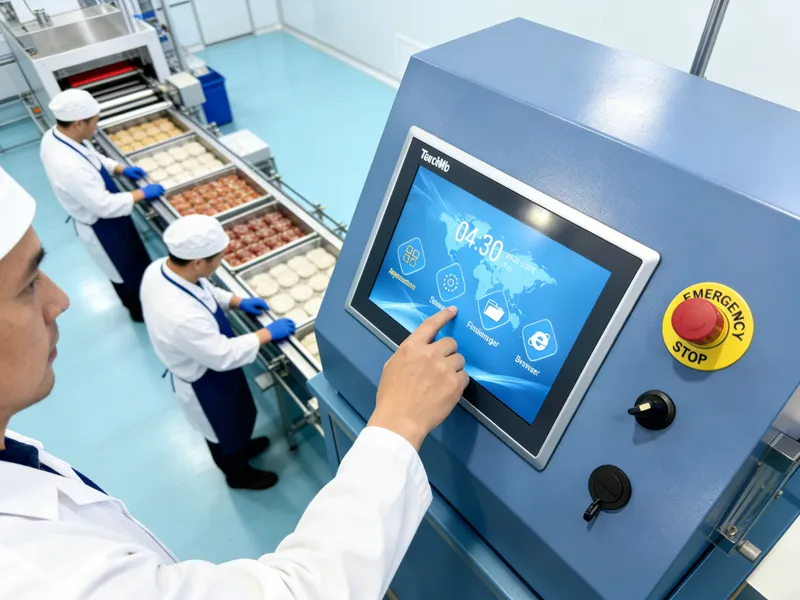
โดยผสมผสานการแสดงภาพและการตรวจจับแบบสัมผัสไว้ในส่วนเดียว. นอกจากจะใช้งานง่ายแล้ว, อีกทั้งยังช่วยเพิ่มประสิทธิภาพในเชิงพาณิชย์อีกด้วย, อุปกรณ์อุตสาหกรรมและสาธารณะ. คู่มือนี้แชร์คำจำกัดความพื้นฐาน, ตรรกะการทำงาน, ประเภทหลัก, จุดแข็งและการใช้งานหน้าจอสัมผัสในโลกแห่งความเป็นจริง.
ความหมายพื้นฐานของหน้าจอสัมผัส
หน้าจอสัมผัสเป็นส่วนประกอบการแสดงผลแบบโต้ตอบที่ผสานรวม. โดยจะแสดงรูปภาพและรับข้อมูลทางกายภาพโดยตรงจากผู้ใช้ในเวลาเดียวกัน.
1. การออกแบบจอแสดงผลและการตรวจจับแบบผสมผสาน
หน้าจอสัมผัสมาตรฐานมีสองชั้นหลัก. หนึ่งเลเยอร์ให้เนื้อหาภาพที่ชัดเจน. อีกชั้นหนึ่งจับสัญญาณการสัมผัสจากนิ้วหรือเครื่องมือ. พวกเขาทำงานเป็นอันหนึ่งอันเดียวกัน.
2. ปฏิสัมพันธ์ระหว่างมนุษย์กับเครื่องจักรโดยตรง
ผู้ใช้แตะ, เลื่อนหรือกดพื้นผิวหน้าจอเพื่อส่งคำสั่ง. พวกเขาข้ามอุปกรณ์เสริมอินพุตเพิ่มเติม. โหมดเรียบง่ายนี้ช่วยลดต้นทุนการเรียนรู้สำหรับผู้ใช้ทุกคน.
3. การปรับตัวของสถานการณ์ในวงกว้าง
หน้าจอสัมผัสมีหลายขนาดและหลายเกรด. รุ่นสำหรับงานเบาเหมาะกับอุปกรณ์ของผู้บริโภคทั่วไป. รุ่นสำหรับงานหนักรองรับเครื่องจักรอุตสาหกรรมและอาคารผู้โดยสารสาธารณะ.
หน้าจอสัมผัสมาตรฐานทำงานอย่างไร
หน้าจอสัมผัสทุกจอจะเป็นไปตามวงจรที่สม่ำเสมอเพื่อประมวลผลการกระทำสัมผัสแต่ละครั้ง. กระบวนการทั้งหมดใช้เวลาเพียงไม่กี่มิลลิวินาที.
1. สร้างสัญญาณสัมผัสที่มีประสิทธิภาพ
อันดับแรก, การสัมผัสทางกายภาพจะเปลี่ยนสถานะภายในของหน้าจอ. รูปแบบหน้าจอที่แตกต่างกันทำให้เกิดการเปลี่ยนแปลงทางไฟฟ้า, การเปลี่ยนแปลงความดันหรือการอุดตันของแสง. สิ่งเหล่านี้กลายเป็นสัญญาณที่ถูกต้อง.
2. บันทึกข้อมูลตำแหน่งที่แม่นยำ
ต่อไป, เซ็นเซอร์ในตัวตรวจจับการเปลี่ยนแปลงเล็กๆ น้อยๆ ได้ทันที. พวกเขาคำนวณจุดที่แน่นอนที่เกิดการสัมผัส. พวกเขายังติดตามการเคลื่อนไหวแบบเลื่อนแบบเรียลไทม์.
3. กรองสัญญาณรบกวนที่ไร้ประโยชน์
แล้ว, ชิปภายในแยกแยะสัญญาณเท็จจากฝุ่นหรือการกระแทกเล็กน้อย. โดยจะเก็บข้อมูลการปฏิบัติงานจริงเท่านั้น. ขั้นตอนนี้ป้องกันการตอบสนองที่ไม่ถูกต้องระหว่างการใช้งาน.
4. ดำเนินการคำสั่งและข้อเสนอแนะ
ในที่สุด, อุปกรณ์หลักจะรันฟังก์ชันที่ตรงกัน. หน้าจอจะรีเฟรชเนื้อหาเพื่อยืนยันการดำเนินการ. การดำเนินการนี้จะเสร็จสิ้นการวนซ้ำการโต้ตอบแบบเต็มหนึ่งรอบ.
ประเภทหลักของหน้าจอสัมผัสและคุณสมบัติต่างๆ
รูปแบบหน้าจอสัมผัสที่แตกต่างกันใช้เทคโนโลยีการเหนี่ยวนำที่เป็นเอกลักษณ์. แต่ละประเภทเหมาะกับสภาพแวดล้อมการทำงานเฉพาะ.
1. หน้าจอสัมผัสแบบคาปาซิทีฟ
รูปแบบนี้จะตรวจจับกระแสไฟฟ้าอ่อนๆ จากนิ้วของมนุษย์. ให้การตอบสนองที่รวดเร็วและประสบการณ์มัลติทัชที่ราบรื่น. ดังนั้น, มันครอบงำเทอร์มินัลเชิงพาณิชย์และอุปกรณ์อัจฉริยะรายวัน.
2. หน้าจอสัมผัสแบบต้านทาน
มันตอบสนองต่อแรงกดดันทางกายภาพโดยตรง. มันทำงานได้ดีด้วยมือเปล่า, ถุงมือและสไตลัส. เป็นตัวเลือกอันดับหนึ่งสำหรับฝุ่น, การประชุมเชิงปฏิบัติการอุตสาหกรรมชื้น.
3. หน้าจอสัมผัสอินฟราเรด
สร้างเส้นตารางแสงที่มองไม่เห็นรอบๆ กรอบหน้าจอ. วัตถุทึบใดๆ ก็สามารถกระตุ้นการตอบสนองได้. มีความสามารถในการป้องกันความเสียหายที่แข็งแกร่งสำหรับหน้าจอแสดงผลสาธารณะขนาดใหญ่.
4. หน้าจอสัมผัสคลื่นเสียงบนพื้นผิว
ใช้คลื่นอัลตร้าโซนิคในการวางตำแหน่ง. ให้การส่องผ่านของแสงสูงและการมองเห็นที่ชัดเจน. ทำงานได้ดีสำหรับอุปกรณ์มืออาชีพที่มีความแม่นยำสูง.
ข้อดีที่สำคัญของการใช้หน้าจอสัมผัส
หน้าจอสัมผัสสมัยใหม่มีการปรับปรุงที่ชัดเจนกว่าการตั้งค่าการแสดงผลแบบเดิมๆ.
1. ลดความซับซ้อนของขั้นตอนการทำงานในแต่ละวัน
การควบคุมแบบสัมผัสโดยตรงช่วยลดการกระทำที่ซับซ้อน. ผู้ใช้ใหม่สามารถดำเนินการหลักได้ในเวลาอันสั้น. มันเพิ่มความเร็วในการทำงานโดยรวมอย่างเห็นได้ชัด.
2. ประหยัดพื้นที่การติดตั้งและการจัดวาง
หน้าจอเดียวที่รวมเข้าด้วยกันจะแทนที่ชิ้นส่วนหลายชิ้นที่แยกจากกัน. ช่วยลดการเดินสายไฟที่ยุ่งเหยิงบนโต๊ะและแผงอุปกรณ์. มันสร้างสภาพแวดล้อมการทำงานที่เรียบร้อย.
3. ปรับปรุงความทนทานในระยะยาว
หน้าจอสัมผัสคุณภาพใช้วัสดุป้องกันรอยขีดข่วนและป้องกันคราบ. พวกเขาทนทานต่อการใช้งานความถี่สูงซ้ำๆ. พวกเขาลดต้นทุนการเปลี่ยนอุปกรณ์.
4. รองรับการปรับแต่งที่ยืดหยุ่น
ผู้ผลิตปรับขนาด, ความไวและคุณสมบัติพื้นผิว. การออกแบบที่กำหนดเองตอบสนองความต้องการพิเศษสำหรับอุตสาหกรรม, ฉากการจัดเลี้ยงและบริการสาธารณะ.
สถานการณ์การใช้งานทั่วไปสำหรับหน้าจอสัมผัส
ขณะนี้หน้าจอสัมผัสให้บริการเกือบทุกสาขาที่ต้องการปฏิสัมพันธ์ระหว่างมนุษย์กับเครื่องจักร.
1. อาคารบริการตนเองเชิงพาณิชย์
เครื่องสั่งซื้อและอุปกรณ์ชำระเงินใช้หน้าจอสัมผัสกันอย่างแพร่หลาย. พวกเขาจัดการกับกระแสลูกค้าจำนวนมากในช่วงเวลาทำการที่มีลูกค้าหนาแน่น.
2. อุปกรณ์ควบคุมอุตสาหกรรม
แผงควบคุมการประชุมเชิงปฏิบัติการใช้หน้าจอสัมผัสที่ทนทาน. พวกมันปรับให้เข้ากับการสั่นสะเทือน, การทำงานแบบฝุ่นและสวมถุงมือในสภาพโรงงานที่รุนแรง.
3. การสอบสวนสาธารณะและอุปกรณ์แสดงผล
ซุ้มข้อมูลและหน้าจอนิทรรศการต้องใช้หน้าจอสัมผัส. ช่วยให้ผู้มาเยือนทุกวัยเข้าถึงได้ง่าย.
4. อุปกรณ์สำนักงานและอุปกรณ์การประชุมอัจฉริยะ
จอภาพสำนักงานและหน้าจอการประชุมใช้หน้าจอสัมผัสประสิทธิภาพสูง. ทำให้การควบคุมและแบ่งปันเอกสารสะดวกยิ่งขึ้น.
คำถามที่พบบ่อยเกี่ยวกับหน้าจอสัมผัส
ไตรมาสที่ 1: ความแตกต่างระหว่างหน้าจอสัมผัสและจอแสดงผลปกติคืออะไร?
A1: จอแสดงผลปกติจะแสดงเฉพาะรูปภาพเท่านั้น. หน้าจอสัมผัสเพิ่มเลเยอร์การตรวจจับเพื่อรับคำสั่งการสัมผัสโดยตรงโดยไม่ต้องใช้เครื่องมือเพิ่มเติม.
ไตรมาสที่ 2: หน้าจอสัมผัสใดทำงานได้ดีที่สุดสำหรับใช้ในอุตสาหกรรม?
A2: หน้าจอสัมผัสแบบต้านทานเป็นตัวเลือกที่ดีที่สุด. รองรับการทำงานที่สวมถุงมือและทนทานต่อสภาพแวดล้อมการทำงานที่รุนแรง.
ไตรมาสที่ 3: เหตุใดหน้าจอสัมผัสบางรุ่นจึงใช้งานไม่ได้กับถุงมือ?
A3: หน้าจอสัมผัสแบบคาปาซิทีฟกระแสหลักส่วนใหญ่อาศัยสัญญาณไฟฟ้าจากร่างกาย. ถุงมือปิดกั้นการถ่ายโอนสัญญาณและหยุดการเหนี่ยวนำปกติ.
ไตรมาสที่ 4: ฉันจะรักษาหน้าจอสัมผัสให้อยู่ในสภาพดีได้อย่างไร?
A4: อย่าใช้ของมีคมบนพื้นผิว. ทำความสะอาดฝุ่นและคราบสกปรกอย่างสม่ำเสมอ. การดูแลแบบเรียบง่ายสามารถยืดอายุการใช้งานได้อย่างมาก.
คำถามที่ 5: หน้าจอสัมผัสสามารถทำงานต่อเนื่องได้ 24 ชั่วโมง?
A5: จอสัมผัสเกรดอุตสาหกรรมและเชิงพาณิชย์รองรับการทำงานแบบไม่หยุดนิ่ง. พวกเขารักษาประสิทธิภาพที่มั่นคงตลอดเวลา.
บทสรุป
เพื่อสรุป, หน้าจอสัมผัสเป็นอุปกรณ์โต้ตอบแบบครบวงจรที่รวมฟังก์ชันการแสดงผลและการตรวจจับการสัมผัสเข้าด้วยกัน. มีประเภทกระแสหลักสี่ประเภทพร้อมคุณสมบัติที่แตกต่างกันสำหรับสถานการณ์ที่แตกต่างกัน. มันทำให้การดำเนินงานง่ายขึ้น, ประหยัดพื้นที่และมอบประสิทธิภาพที่เชื่อถือได้ในระยะยาว. มันได้กลายเป็นส่วนสำคัญของอุปกรณ์เชิงพาณิชย์และอุตสาหกรรมสมัยใหม่.
หากคุณต้องการซื้อคุณภาพสูง, หน้าจอสัมผัสแบบกำหนดเองสำหรับการผลิตอุปกรณ์ของคุณ, ทดแทนหรือโครงการใหม่, กรุณากรอกแบบฟอร์มสอบถามบนเว็บไซต์อย่างเป็นทางการของเรา. ปล่อยให้ขนาดหน้าจอของคุณ, สภาพแวดล้อมการใช้งานและความต้องการด้านการใช้งาน. ทีมงานมืออาชีพของเราจะส่งแผนผลิตภัณฑ์ที่เหมาะสมและการสนับสนุนทางเทคนิคโดยละเอียดให้คุณทันที.