
Moderne detail- og cateringvirksomheder forfølger hurtige og smidige selvbetjeningsarbejdsgange. Manuel checkout sænker kundeflowet og øger personalepresset i myldretiden. Af denne grund, flere butiksejere anvender intelligente selvbetjeningsenheder.
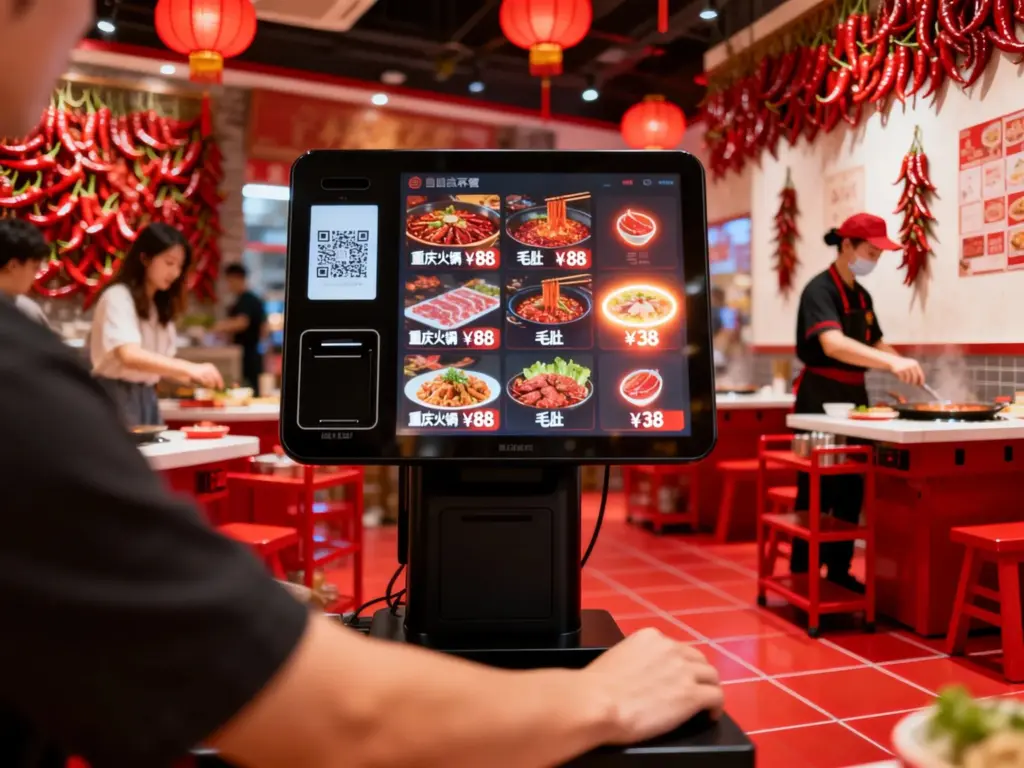
Betalingskiosker står som kerneudstyr til ubemandet kasse. De erstatter gentagne manuel fakturering og leverer stabile transaktionsresultater hver dag. Alligevel, mange virksomhedsoperatører forstår ikke fuldt ud deres arbejdslogik. Denne artikel forklarer kernekomponenter, fuldføre arbejdstrin, driftsmæssige fordele og almindelige ofte stillede spørgsmål til betalingskiosker.
Kernehardwarekomponenter, der driver betalingskiosker
Enhver funktionel enhed er afhængig af matchede hardwaremoduler. Disse dele arbejder sammen for at afslutte fuld betalingsarbejdsgange støt.
1. Interaktiv berøringsskærm
Berøringsskærmen fungerer som den primære brugerindgang. Den viser ordredetaljer, prisoplysninger og kampagner i realtid. Den fanger brugertryk og bekræfter hver handling med det samme.
2. Intelligent kontrolmodul
Denne kerneenhed behandler alle systemdata og driftslogik. Den beregner ordretotaler og matcher gyldige butiksrabatter. Det sikrer nøjagtige og ensartede faktureringsresultater.
3. Multifunktionelt betalingsmodul
Denne nøgledel understøtter alle almindelige betalingsmetoder. Den håndterer mobilscanninger, kortstryg og kontantindsættelse. Det verificerer transaktionsstatus og garanterer fondens sikkerhed.
4. Enhed til udskrivning af kvittering
Efter vellykket betaling, dette modul udskriver detaljerede transaktionskvitteringer. Den registrerer ordrenumre, forbrugsvarer og betalingstid for brugerbevis.
5. Datatransmissionsport i realtid
Det forbinder betalingskiosker med butiks backend-systemer. Det uploader transaktionsregistreringer og synkroniserer ordrestatus øjeblikkeligt. Det understøtter unified store data management.
Trin-for-trin arbejdsproces for betalingskiosker
Betalingskiosker følger en enkel, standardiseret arbejdsgang. Brugere kan afslutte fuld betaling på mindre end et minut.
1. Indlæs opdaterede ordre- og prisdata
Først, kiosken kobles til butikssystemet. Den indlæser menuer i realtid, produktpriser og aktive kampagneaktiviteter på skærmen.
2. Modtag og bekræft brugerordrer
Næste, brugere vælger produkter og justerer personlige behov på berøringsskærmen. De tjekker varelister og subtotaler før den endelige bekræftelse.
3. Beregn det endelige betalingsbeløb automatisk
Så, systemet anvender kvalificerede kuponer og kombinationsrabatter automatisk. Det genererer et nøjagtigt endeligt beløb for brugerne.
4. Behandle brugerbetalingsanmodninger
Brugere vælger deres foretrukne betalingsmetode. Betalingsmodulet verificerer transaktioner og gennemfører fondsfradrag i realtid.
5. Synkroniser data og generer transaktionsposter
Endelig, kiosken opdaterer ordrestatus til betalt. Den uploader data til backend og udskriver kvitteringer for at afslutte hele arbejdsgangen.
Unikke operationelle funktioner i moderne betalingskiosker
Avancerede betalingskiosker tilføjer optimerede funktioner, der passer til forskellige forretningsscenarier. Disse funktioner forbedrer den overordnede servicestabilitet.
1. Intelligent rabatmatching
Systemet identificerer automatisk alle gyldige butikskampagner. Den vælger den bedste rabatplan for at spare kundeomkostninger.
2. Datasynkronisering i realtid
Hver transaktionspost uploades umiddelbart efter betaling. Butikschefer fjernkontrollerer salgsdata til enhver tid.
3. Betalingstilpasning i flere scenarier
Disse kiosker understøtter digitale og kontante betalingstilstande. De tilpasser sig forskellige brugervaner og reducerer antallet af betalingsfejl.
4. Intelligent fejlmeddelelse
Systemet registrerer unormale operationer øjeblikkeligt. Det dukker tydelige meddelelser op for at vejlede brugere og undgå transaktionsfejl.
Håndgribelige forretningsmæssige fordele ved betalingskiosker
Betalingskiosker skaber langsigtet værdi for alle offline kommercielle scenarier. De optimerer daglige butiksdriftstilstande.
1. Forbedre kasseeffektiviteten markant
Flere betalingskiosker arbejder på samme tid. De spreder spidsbelastningstiden og forkorter kundernes ventetid effektivt.
2. Fjern manuelle faktureringsfejl
Intelligent systemberegning erstatter manuel optælling. Det fjerner menneskelige fejl og holder enhver transaktion nøjagtig.
3. Reducer butiksarbejdspresset
Kiosker udfører gentagne kassearbejde. Personalet fokuserer på produktproduktion og kundeservice af høj kvalitet.
4. Standardiser kvaliteten af butiksservice
Alle brugere følger den samme betjeningsproces. Systemet leverer ensartet service uden manuel forskel.
Ofte stillede spørgsmål om, hvordan betalingskiosker fungerer
Q1: Er betalingskiosker svære at betjene for nye brugere?
A1: Ingen. Betalingskiosker anvender intuitive grænseflader og klare tekstprompter. Alle brugere kan afslutte uafhængig betaling uden personalevejledning.
Q2: Har betalingskiosker brug for stabil netværkssupport?
A2: Ja. Stabilt netværk sikrer datasynkronisering i realtid og nøjagtig rabatmatching. Nogle modeller understøtter grundlæggende offline nødbetaling.
Q3: Kan betalingskiosker forhindre falske eller mislykkede betalinger?
A3: Ja. Professionelle betalingsmoduler har indbyggede verifikationssystemer. De kontrollerer transaktionens ægthed og undgår unormale ordrer.
Q4: Kan handlende tilpasse funktioner til betalingskiosker?
A4: Absolut. Virksomhedsejere kan justere prissætningsregler, rabattilstande og betalingskanaler, der matcher butiksdriftens behov.
Q5: Er betalingskiosker velegnede til langtidsdrift?
A5: Ja. Betalingskiosker i kommerciel kvalitet understøtter kontinuerligt arbejde hele dagen. De opretholder en stabil ydeevne til langsigtet kommerciel brug.
Konklusion
For at konkludere, betalingskiosker arbejder gennem koordinerede hardwaremoduler og intelligente softwaresystemer. De fuldender ordrevisning, rabatberegning, sikker betaling og dataregistrering i enkle trin. Disse smarte enheder forbedrer betalingseffektiviteten, eliminere manuelle fejl og reducere butikkens lønomkostninger. De er blevet essentielt smart udstyr til moderne catering, detail- og offentlige serviceerhverv.
Hvis du ønsker at implementere høj stabilitet, fuldt funktionelle betalingskiosker til at opgradere din butiks selvbetjeningssystem, udfyld venligst forespørgselsformularen på vores officielle hjemmeside. Del dine forretningsscenarier og funktionelle krav, og vores team vil levere skræddersyede professionelle løsninger til dit projekt.





