Many industrial and commercial devices need a compact, all-in-one computing solution. Traditional setups combine a separate computer host, display screen and input device. This arrangement takes up valuable space and creates complex wiring. ด้วยเหตุนี้, more and more projects turn to a single integrated device instead.
A panel PC solves this problem by combining computing power, display and touch input into one compact unit. It has become a standard choice for smart factories, self-service kiosks and control rooms. ยังไงก็ตาม, many buyers still confuse it with ordinary desktop computers or simple monitors. This article explains what a panel PC is, its core structure, main types and practical application scenarios.
The Basic Definition of a Panel PC
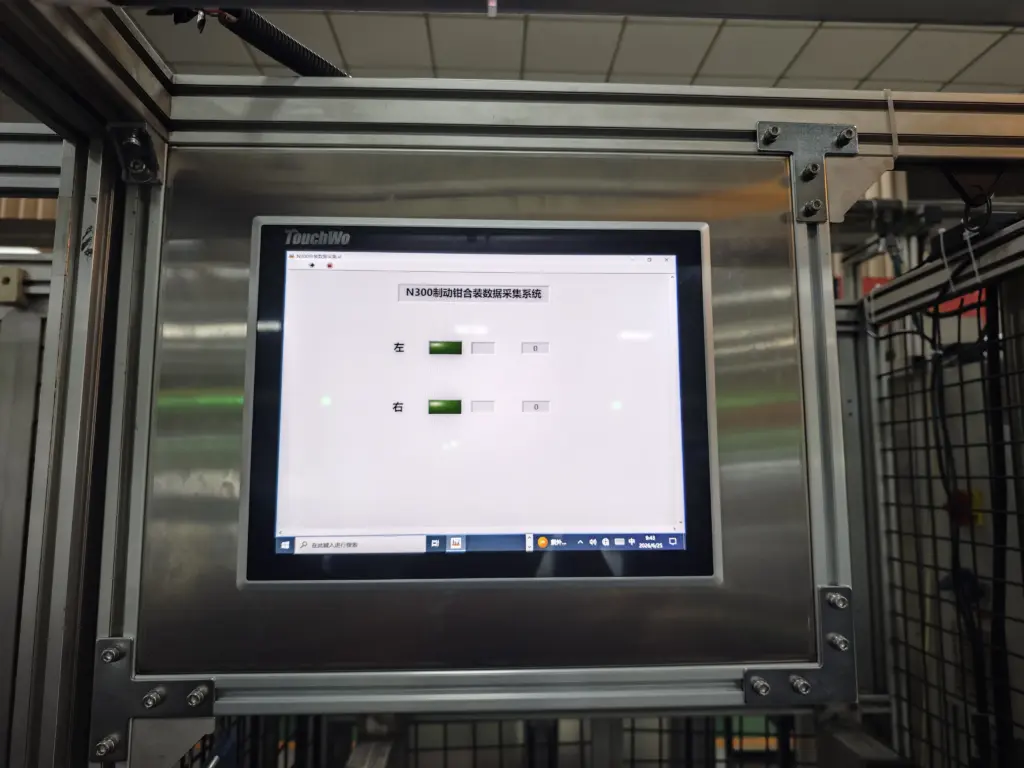
A panel PC is an all-in-one industrial computer that integrates a motherboard, processor, หน่วยความจำ, พื้นที่จัดเก็บ, display screen and touch interface into a single sealed enclosure. Unlike a desktop computer, it does not need a separate host tower. Unlike a plain monitor, it can run software and process data independently.
ในระยะสั้น, a panel PC acts as a complete computer that you can mount directly on a machine, wall or equipment cabinet. Its compact design saves space and simplifies installation. Most models also support fanless cooling, which reduces moving parts and improves long-term reliability.
Core Components That Make Up a Panel PC
Every panel PC contains several key hardware parts working together. Understanding these parts helps you judge whether a model fits your project.
Computing core and storage
The computing core includes a processor, memory and storage drive. These parts determine how fast the device runs software and handles data. Industrial panel PCs often use low-power processors that stay stable during continuous operation.
Display and touch layer
The display screen shows operation interfaces, data and status information. Most panel PCs use a touch screen as the main input method. Users tap or slide the screen to send commands without a separate keyboard or mouse.
Sealed enclosure and cooling system
The enclosure protects internal parts from dust, moisture and vibration. Many panel PCs use fanless cooling through the metal casing itself. This design removes fan failure risks and keeps the device quiet during long working hours.
Interface ports for external connections
Standard panel PCs provide multiple ports, such as Ethernet, ยูเอสบี, serial and video outputs. These ports let the device connect with sensors, เครื่องพิมพ์, scanners and other peripheral equipment. Rich interface support makes the panel PC flexible for different project setups.
Main Types of Panel PCs by Installation Method
Panel PCs come in several mounting styles. Each style fits a different installation environment.
Embedded panel PCs
Embedded models install flush into a machine panel or cabinet cutout. They sit level with the surface and create a clean, integrated look. This type is the most common choice for industrial machine control and equipment integration.
Wall-mounted panel PCs
Wall-mounted models attach directly to a wall or vertical surface. They work well in control rooms, production lines and public service areas where wall space is available. Installation is simple and does not require cutting into equipment.
Desktop and VESA-mounted panel PCs
Some panel PCs support desktop stands or standard VESA mounting arms. These models suit office workstations, testing benches and temporary deployment scenarios. Users can adjust the viewing angle freely.
Key Advantages of Using a Panel PC
Compared with separate computer and display setups, a panel PC offers several clear benefits for industrial and commercial use.
Space-saving compact design
A panel PC combines all hardware into one unit. It eliminates the need for a separate computer tower and reduces cable clutter. This compact form is especially valuable in tight machine cabins and crowded control panels.
High reliability for continuous operation
Most industrial panel PCs use fanless cooling and sealed enclosures. They resist dust, humidity and vibration better than ordinary desktop computers. These features make them suitable for 24-hour continuous operation in demanding environments.
Simplified deployment and maintenance
Installing a panel PC requires only mounting and cable connection. There is no need to assemble separate host, display and input devices. When maintenance is needed, the single-unit design also makes replacement faster and easier.
Flexible peripheral connectivity
With multiple built-in ports, a panel PC can connect directly to sensors, กล้อง, printers and network devices. This flexibility lets one device handle data collection, display and control at the same time.
Common Application Scenarios for Panel PCs
Panel PCs serve a wide range of industries due to their compact size and reliable performance.
Industrial automation and machine control
Factories use panel PCs on production lines to monitor equipment status, adjust parameters and collect production data. Their sealed design protects internal parts from workshop dust and vibration.
Commercial self-service kiosks
Self-ordering machines, ticketing terminals and information kiosks rely on panel PCs as their core computing unit. The all-in-one structure keeps the kiosk compact and visually clean.
Medical and healthcare equipment
Hospitals use panel PCs for patient check-in, medical record display and equipment control. Fanless models reduce noise and avoid circulating dust in clean environments.
Smart building and energy management
Building control rooms use panel PCs to monitor lighting, เครื่องปรับอากาศ, security and energy systems. The touch interface lets operators switch between different management screens quickly.
FAQs About Panel PCs
ไตรมาสที่ 1: What is the difference between a panel PC and a regular desktop computer?
A1: A panel PC integrates the computer, display and touch screen into one sealed unit. A regular desktop computer needs a separate host tower, monitor and input device.
ไตรมาสที่ 2: Can a panel PC work without a fan?
A2: ใช่. Most industrial panel PCs use fanless cooling through the metal enclosure. This design reduces failure points and makes the device suitable for dusty environments.
ไตรมาสที่ 3: Is a panel PC the same as a touch screen monitor?
A3: เลขที่. A touch screen monitor only displays content and accepts touch input. A panel PC contains a full computer system and can run software independently without an external host.
ไตรมาสที่ 4: What industries use panel PCs most often?
A4: Panel PCs are widely used in industrial automation, commercial self-service kiosks, healthcare equipment, smart building control and transportation systems.
คำถามที่ 5: Can a panel PC connect to external devices like printers and sensors?
A5: ใช่. Standard panel PCs provide Ethernet, ยูเอสบี, serial and other ports. They can connect to printers, เครื่องสแกน, sensors and various industrial peripheral equipment.
บทสรุป
โดยสรุป, a panel PC is a compact, all-in-one industrial computer that combines computing, display and touch input in a single sealed unit. It differs from ordinary desktop computers by its space-saving design, fanless reliability and flexible mounting options. ฝังตัว, wall-mounted and desktop models fit different installation environments. Panel PCs have become essential hardware for industrial automation, ซุ้มบริการตนเอง, medical equipment and smart building systems.
If you need a reliable, scenario-matched panel PC for your industrial or commercial project, กรุณากรอกแบบฟอร์มสอบถามบนเว็บไซต์อย่างเป็นทางการของเรา. Share your usage environment, required interfaces and functional needs, and our professional team will recommend a suitable panel PC solution for you.