
Can a PCAP touch screen work reliably with gloves? The answer is yes—but only when the touch system is specifically engineered and tuned for the application. Standard capacitive touchscreens often struggle to detect input through nitrile, مطاط, leather, or heavy industrial gloves, especially in environments affected by moisture, emi, or contaminants.
ل أجهزة طبية, industrial HMIs, محطات الخدمة الذاتية, and outdoor equipment, glove compatibility directly impacts safety, إنتاجية, وتجربة المستخدم. في هذا الدليل, we’ll explain how PCAP touch technology works with gloves, what factors influence performance, how it compares with resistive and infrared alternatives, and how OEM buyers can validate glove-touch reliability before deployment.
Why Glove Touch Matters in Medical and Industrial Projects
Failed glove touch isn’t a minor inconvenience; it’s a safety violation and a workflow killer. In critical environments, reliable gloved interaction is a non-negotiable operational requirement.
Ensuring Safety and Operational Continuity
Glove touch capability is fundamentally a safety and productivity feature, not a nice-to-have. When a screen fails to respond to a gloved hand, it directly compromises established protocols and brings critical work to a standstill.
- Operators in both medical and industrial fields must wear PPE continuously. Forcing them to remove gloves to use a screen is a direct violation of safety protocols.
- في الرعاية الصحية, this functionality is key to preventing breaks in sterile fields and reducing the risk of cross-contamination and infection.
- For industrial workers, reliable glove touch keeps hands protected from chemicals, machinery hazards, and extreme temperatures at all times.
- A screen that can’t be operated with gloves is effectively useless, halting workflows, causing delays, and killing productivity.
Meeting Demands in Critical Medical Environments
In a clinical setting, كل ثانية مهمة, and equipment must perform flawlessly under challenging conditions. Touchscreens on medical devices face a unique set of demands that go far beyond simple touch recognition.
- Diagnostic and monitoring equipment, like ventilators or infusion pumps, requires immediate and confident interaction from clinicians.
- The screen must function without error even when wet with disinfectants, saline, gels, or other bodily fluids.
- بالسعة المتوقعة (PCAP) screens need to work through the sterile drapes or plastic bags used for infection control in operating rooms and ICUs.
- The system has to be compatible with antimicrobial glass surfaces, ensuring hygiene doesn’t come at the cost of performance.
Supporting Operations in Harsh Industrial Settings
On the factory floor or out in the field, touchscreens are exposed to everything from heavy machinery to harsh weather. Consistent performance with safety gloves is essential for keeping operations running smoothly and safely.
- Production line HMIs must be fully operable by workers who wear thick safety gloves for their entire shift.
- Outdoor terminals in logistics, زيت & غاز, or field service need to function with insulated or chemical-resistant gloves in wet, cold, or dirty conditions.
- Accurate touch input reduces errors when controlling machinery, adjusting setpoints, or responding to critical alarms.
- PCAP systems require robust shielding to prevent electromagnetic interference (emi) from nearby motors and drives from causing false or missed touches.
Core Engineering and Design Factors
Achieving reliable glove touch isn’t about a single component; it’s a result of system-level design where hardware and software are optimized together. The entire stack, from the glass to the firmware, must be engineered for this specific purpose.
- PCAP touch controllers are tuned for higher sensitivity, allowing them to detect the much weaker electrical signal that passes through glove materials.
- The thickness and material of the cover glass directly affect sensitivity, so it must be co-designed and validated with the touch sensor.
- You can’t guess. Performance must be tested and validated with the exact nitrile, مطاط, or heavy-duty industrial gloves that will be used on-site.
- Because gloved hands are less precise, user interfaces often need larger buttons, wider spacing, and more forgiving gesture recognition.
How PCAP Touch Detects Input Through Different Glove Types
PCAP touchscreens detect disruptions in an electrostatic field. Gloves work if they are thin enough to let a finger’s effect through or if the system is tuned for weaker signals.
The Capacitive Coupling Principle
PCAP technology operates by projecting an electrostatic field from an electrode grid located beneath the screen’s surface. A touch is registered when a conductive object, مثل الاصبع, disrupts this field and changes the capacitance at a specific grid point. The system’s controller constantly measures a baseline capacitance and registers a touch when it detects a significant deviation. A glove allows touch detection if it is thin enough for the user’s finger to still create a sufficient capacitive coupling effect through the material.
Impact of Glove Material and Thickness
The compatibility of a glove is directly tied to its material and thickness. Thin gloves made of materials like latex, النتريل, or vinyl often work because they do little to insulate the finger from the screen’s electric field. في المقابل, سميك, insulating gloves made from cloth, leather, or heavy rubber block this capacitive coupling, preventing the controller from detecting a touch. As glove thickness increases, the touch signal strength decreases, making detection less reliable. To solve this, specially designed touchscreen gloves incorporate conductive fibers in the fingertips to reliably transfer the capacitive effect.
System-Level Enhancements for Glove Mode
Manufacturers use several system-level enhancements to enable glove functionality. High-sensitivity touch controller ICs can better detect the weak signals produced by gloved hands. Firmware tuning, often called “glove mode,” lowers the detection threshold, allowing the system to recognize smaller changes in capacitance as valid touches. Improving the system’s signal-to-noise ratio (SNR) also helps distinguish a faint gloved touch from background electrical interference. Some PCAP systems utilize self-capacitance sensing, which is inherently more sensitive to weaker signals and better suited for thick gloves than mutual-capacitance.
Practical Limitations and Real-World Validation
Even with enhancements, physical limits exist. Some vendors specify a maximum glove thickness, often around 6 مم. Using a glove mode can also introduce performance trade-offs, like reducing the number of supported simultaneous touch points. It is crucial to remember that PCAP detects capacitance, not pressure; pressing harder with an insulating glove will not register if it fails to create an electrical disturbance. The most reliable way to ensure compatibility is to test the PCAP system with the exact gloves intended for the final application, as material compositions and construction vary significantly.
Get Custom Industrial Touchscreens, Delivered Fast
Key Factors That Affect Glove Compatibility and Touch Accuracy
Touchscreen performance with gloves isn’t random. It’s a direct result of glove material, ملائم, screen technology, and user technique, forcing a series of practical trade-offs.
Glove Material and Construction
The material of a glove is the single biggest factor in its performance on a capacitive screen. Nitrile gloves generally outperform vinyl or polyethylene, especially when they include conductive additives that help mimic the electrical properties of skin. This is because standard gloves act as insulators, blocking the signal the screen needs to register a touch.
Thickness also plays a critical role. A thinner glove, around 3–4 mil, allows the electrical signal to pass through more effectively than a thicker, more protective alternative. For reliable use, gloves designed with conductive elements like carbon black or silver threads create a direct path for the signal, bypassing the material’s insulating properties entirely. أخيراً, a smooth fingertip surface provides more consistent screen contact than a heavily textured finish designed for grip on physical objects.
Fit and User Technique
How the glove fits is just as important as what it’s made of. A snug fit ensures the fingertip maintains stable, consistent contact with the screen, which dramatically improves sensitivity and accuracy. Loose-fitting gloves are a primary cause of failure, as the air gaps and movement reduce the signal strength, leading to missed taps and unreliable swipes.
The way a user interacts with the screen also matters. Using the flat pad of the fingertip creates a larger and more reliable contact area than using the very tip, nail, or edge of the glove. In situations where conductivity is marginal, you might find that simple taps still work but more complex gestures like swiping or pinching fail. This is a clear indicator that the signal is too weak for continuous tracking.
Screen Technology and Surface Condition
Not all touch screens are created equal. Most modern devices use projected capacitive (PCAP) شاشات, which require electrical coupling to detect a touch. Standard insulating gloves block this coupling, rendering the screen unusable. على الجانب الآخر, older resistive touch screens respond to direct physical pressure, which makes them inherently compatible with nearly any type of glove, regardless of material.
The condition of the glove’s surface can also interfere with performance. Any debris, زيت, or moisture can disrupt conductivity and prevent the screen from recognizing input. And just like any other piece of equipment, gloves wear out. Performance degrades over time, so replacing them regularly is key to maintaining reliable touch interaction.
Key Performance Trade-Offs
When selecting gloves for touchscreen use, you’ll always face a series of trade-offs. The most common is protection versus responsiveness. Thicker gloves offer better barrier protection but almost always reduce touch sensitivity. Similarly, a textured fingertip might improve grip on tools and components but will likely decrease touch precision on a smooth glass screen.
أخيراً, there’s a conflict between durability and conductivity. More durable materials are often better insulators, which is exactly what you don’t want for a capacitive screen. This is why specialized industrial gloves for touchscreen use are treated with conductive coatings or threads—they are engineered to overcome this natural trade-off.
When PCAP Is Better Than Resistive or Infrared Alternatives
PCAP touch technology excels in applications demanding fast multi-touch, high optical clarity, and a durable, easy-to-seal glass front, making it the modern choice over older resistive and IR systems.
Superior Touch Performance and User Experience
PCAP offers a user experience similar to a modern smartphone. It supports true multi-touch gestures like pinch-to-zoom, something standard resistive screens can’t do. The touch response is light and fast, unlike resistive technology that requires physical pressure to register a touch. PCAP also delivers better positional accuracy, making it easier to hit small on-screen targets compared to the grid-based resolution of IR or the potential for drift in resistive layers.
Durability and Optical Clarity
The front surface of a PCAP screen is a glass cover lens. This makes it far more resistant to scratches and easier to clean with harsh industrial chemicals than the soft plastic film found on resistive touchscreens. Visually, PCAP is clearer. It provides higher light transmission without the multiple layers of resistive tech that can cause haze or distort the image. Its solid-state design has no moving parts, giving it a longer operational life than resistive panels that rely on mechanical flexing and eventually wear out.
Advanced Glove and Contaminant Tuning
While older technologies might seem better for glove use, modern PCAP controllers have advanced significantly. They can be finely tuned to detect touches from various types of work gloves, combining reliable glove support with high performance. The firmware is also smart enough to distinguish between an intentional touch and environmental factors like water droplets, which reduces the false activations common with IR systems. This allows PCAP to offer both high-precision gloved operation and multi-touch gestures—a combination that resistive and IR simply can’t match.
Modern Industrial Design and Environmental Sealing
PCAP technology enables sleek, bezel-free, edge-to-edge glass designs. This look integrates well into modern equipment and makes the surface extremely easy to clean. في المقابل, IR technology requires a bulky physical bezel to house its sensors, creating a frame that traps dust and complicates sealing against liquids. The solid glass front of a PCAP screen can be fully sealed to achieve high IP ratings for protection against water and dust, offering a much more robust solution than sealing a flexible resistive panel.
How OEM Buyers Should Validate Glove-Touch Performance
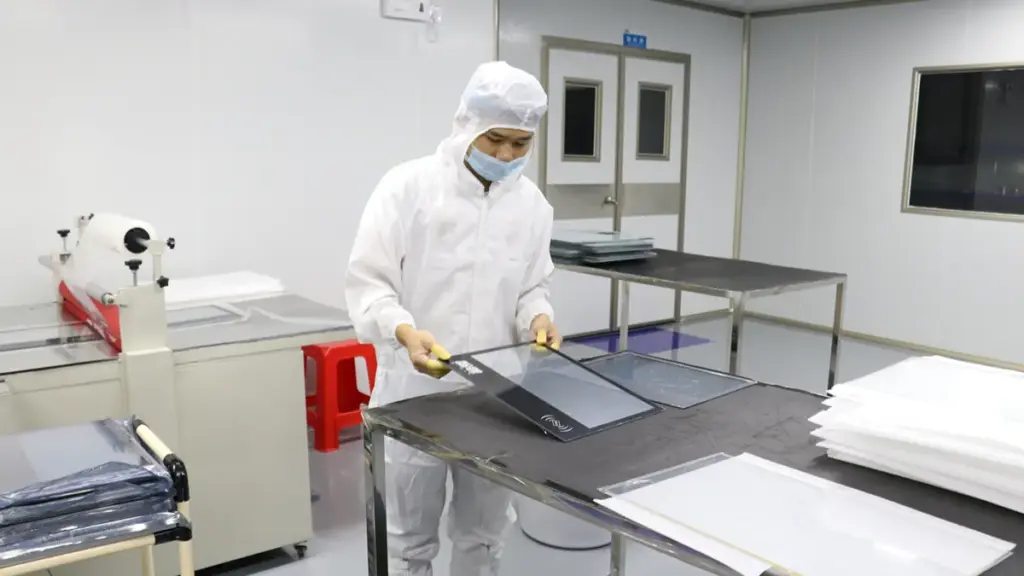
Effective validation requires a structured program that tests the final integrated system with real-world gloves and environmental conditions, not just isolated component checks in a lab.
| مرحلة التحقق | Key Actions & Requirements |
|---|---|
| Define Test Requirements and Glove Matrix |
|
| Establish a Repeatable Test Environment |
|
| Execute Performance and Immunity Tests |
|
| Analyze Results and Optimize Firmware |
|
| Document Validation and Implement Change Control |
|
Why Touchwo Can Support Glove-Friendly Touch Tuning
TouchWo supports glove tuning by treating it as a system-level problem, combining hardware, البرامج الثابتة, and customization services to match specific industrial and medical needs.
The Challenge of Glove Use with Capacitive Touchscreens
Using gloves with a projected capacitive (PCAP) touchscreen isn’t straightforward. Gloves act as an insulator, reducing the electrical coupling between a finger and the sensor. This weaker signal can cause standard touch settings to completely miss inputs. Support for industrial or medical gloves is never a default feature; it requires a combination of hardware design, controller settings, and firmware tuning. The process involves carefully adjusting detection thresholds and filtering algorithms to recognize the faint signals from gloved hands while rejecting electrical noise.
How TouchWo’s System-Level Approach Enables Tuning
TouchWo approaches its solutions as an integrated system of hardware, embedded software, and application design. This is precisely the mindset needed for effective glove support. The company’s customization services explicitly list glove and wet touch support, confirming that this optimization is well within their service scope. By offering customization, TouchWo can tune the screen’s sensitivity and behavior for specific glove materials, سمك, and the exact environment where the screen will be deployed.
Key Technical Adjustments for Glove Compatibility
Getting a PCAP screen to work reliably with gloves involves several technical adjustments. Increasing touch sensitivity and lowering detection thresholds are the first steps, helping the controller detect the weaker capacitive changes. Many systems also implement a dedicated “glove mode” or adaptive touch profiles that alter the recognition behavior. To deal with the electrically noisy environments common in industrial settings, digital filtering is used to suppress electromagnetic interference (emi) while preserving valid touches. أخيراً, the only way to ensure real-world reliability is to validate performance by testing with the actual gloves from the deployment environment.
Practical Factors Driving the Need for Custom Tuning
The need for custom tuning is driven by real-world variables. Different glove materials and thicknesses produce wildly different touch results, requiring tailored adjustments for each scenario. Industrial environments with dust, رُطُوبَة, or oil can further degrade touch performance, making precise tuning critical for consistent operation. A properly tuned screen allows operators to maintain usability without removing their personal protective equipment (PPE), which is essential for both safety and workflow efficiency.
What to Specify for a Glove-Friendly Application
When planning a project that requires glove compatibility, you need to provide the right details. This ensures the final product meets expectations without back-and-forth adjustments.
- Confirm the panel uses capacitive touch hardware that is inherently suitable for glove tuning.
- Verify that the touch controller exposes the necessary sensitivity or glove-mode settings for adjustment.
- Ensure the solution is tested with the exact gloves—brand, material, and thickness—used in the production environment.
- Communicate whether the operating environment includes wet, مغبر, or oily conditions that require extra optimization.
الأفكار النهائية
Whether you’re developing a medical device, industrial control panel, كشك, or outdoor terminal, selecting a touchscreen supplier that can customize and validate glove-touch performance can significantly reduce deployment risks and improve user experience.
في TouchWo, we provide industrial and commercial PCAP touch solutions with support for glove mode, wet-touch operation, EMI optimization, and project-specific firmware tuning. If your application requires reliable touch interaction while users wear gloves, our engineering team can help evaluate your requirements and recommend the most suitable solution.
أسئلة مكررة
Can PCAP touch screens work with gloves?
نعم, but glove support is not automatic. It requires an industrial PCAP solution specifically designed with a sensitive controller, optimized sensor, and tuned firmware. Standard PCAP screens often fail because most gloves are electrical insulators that block the touch signal. Performance depends heavily on the glove material and thickness.
What gloves work best with capacitive touch screens?
The most reliable gloves are those purpose-built for touchscreen use. These gloves incorporate conductive materials, like silver or carbon-infused fibers, into the fingertips. This design creates a conductive path from the user’s skin to the screen, mimicking a bare-finger touch. Snug-fitting gloves with these features offer the best accuracy.
How thick can gloves be for a PCAP touch screen to work?
A standard PCAP screen can typically handle gloves up to 1.5–2 mm thick. Industrial PCAP systems with a dedicated “glove mode” can be tuned to support gloves up to 3–5 mm thick. For gloves thicker than 5 مم, especially heavy insulated or multi-layer types, other technologies like resistive or infrared touch are generally more reliable.
Why do some capacitive touch screens fail with gloves?
They fail because standard glove materials (like cotton, leather, or rubber) are electrical insulators. These materials block the electrical coupling between the user’s finger and the screen’s sensor. Without this connection, the screen cannot detect the change in capacitance required to register a touch.
Is PCAP or resistive better for medical glove use?
For modern medical devices requiring multi-touch and frequent disinfection, a medical-grade PCAP screen is often preferred, as it performs well with standard thin nitrile or latex gloves. لكن, if the application demands guaranteed operation with very thick, multi-layered, or unpredictable glove types, a resistive touchscreen is a more robust choice because it responds to pressure, not conductivity.
How do suppliers tune PCAP for industrial glove operation?
Suppliers tune PCAP systems through a combination of hardware and firmware adjustments. Hardware strategies include using higher-sensitivity controller chips and optimizing sensor patterns. Firmware tuning involves creating a “glove mode” that lowers touch detection thresholds and uses advanced signal filtering to distinguish weak gloved touches from environmental noise.





