Home

>

News

News

Escape Room Touch Screen

Touch Screen for Escape Room Puzzle Devices

Escape rooms thrive on immersion, challenge, and engagement—every puzzle should draw players into the story and keep them invested until the final clue. Yet outdated puzzle devices—clunky buttons, unresponsive controls, or confusing interfaces—can break the magic, pulling players out of the experience and leaving them frustrated. Traditional puzzle controls often ...

Read More
Bowling Scoreboard Touch Screen

Touch Screen for Bowling Alley Scoreboards

Bowling alleys thrive on fun, efficiency, and engagement—but outdated scoreboards can ruin the experience. Clunky manual scoring, dim displays, and slow updates frustrate bowlers and staff alike. Traditional scoreboards often require constant staff oversight, take time to adjust between games, and fail to deliver the modern, interactive experience today’s bowlers ...

Read More
VR Headset Touch Screen

Touch Screen for Virtual Reality (VR) Headsets

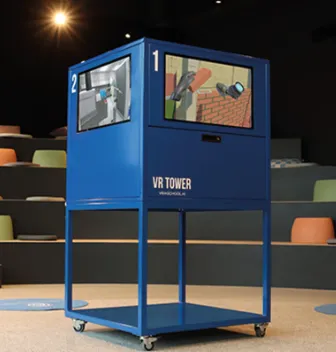
Virtual Reality (VR) headsets transport users to digital worlds, but their magic hinges on seamless, intuitive interaction. Clunky controllers, unresponsive interfaces, and hard-to-reach buttons often break immersion, pulling users out of the virtual experience. Traditional VR controls can feel disjointed, requiring users to memorize complex button combinations or fumble with ...

Read More
Amusement Ride Touch Screen

Touch Screen for Amusement Park Ride Controls

Amusement park rides thrive on excitement, but their success hinges on safe, precise control. Ride operators need interfaces that are fast, intuitive, and built to withstand the harsh park environment—from sun, rain, and dust to constant use by busy staff. Traditional control panels often fall short: laggy responses risk ride ...

Read More
Theater Ticket Kiosk Touch Screen

Touch Screen for Movie Theater Ticket Kiosks

Movie theater ticket kiosks are the first point of interaction for many guests, setting the tone for their entire cinema experience. Yet outdated touch screens often create frustration: laggy responses slow down bookings, dim displays are hard to read in busy lobbies, and fragile surfaces break down under heavy use. ...

Read More
Karaoke System Touch Screen

Touch Screen for Arcade Games: Classic/Modern Titles

Home karaoke is all about fun, convenience, and immersion—turning living rooms into personal stages for family and friends. Yet clunky remote controls, hard-to-read lyric screens, and unresponsive interfaces often ruin the mood. Traditional karaoke setups force users to fumble with buttons to search songs, adjust volume, or scroll lyrics, taking ...

Read More
Self-Ordering

Optimize Restaurant Orders with GD32C3 Self-Ordering Terminal

Restaurants face constant pressure during peak dining hours. Long queues, manual order taking, and limited staff availability can all impact customer experience. For this project, the client wanted to introduce self-ordering terminals that could adapt to different restaurant layouts while supporting essential peripherals. TouchWo provided the GD32C3 32-inch self-ordering terminal, ...

Read More
Arcade Game Touch Screen

Touch Screen for Arcade Games: Classic/Modern Titles

Arcade games have evolved from pixelated classics to immersive modern experiences, but their core appeal hinges on seamless, engaging gameplay. Traditional arcade controls—joysticks, buttons, and trackballs—often fall short for today’s titles, while low-quality touch screens ruin the fun with lag, unresponsive taps, or quick wear. These flaws frustrate players, reduce ...

Read More
Transit Payment Touch Screen

Touch Screen for Public Transit Payment Kiosks

Public transit payment kiosks are the gateway to seamless urban mobility, letting riders purchase fares, reload cards, and access transit services with ease. Yet outdated payment interfaces create unnecessary friction: slow touch responses cause long queues, fragile screens fail in outdoor transit hubs, and complicated payment steps frustrate daily commuters ...

Read More